A Centralized, Trust-First System for Compensation Changes
How I designed GoCo's Compensation Management Feature – from brainstorm to usability-validated release – helping managers and admins make confident, data-driven decisions at scale.
Company
GoCo.io
Role
Lead Product Designer
Timeline
August - October 2024
Tools
Figma, Jira, Mixpanel, FullStory
Context
Overview
Compensation changes are one of the highest-stakes workflows inside any HR platform. A single error — a wrong salary figure, a missed approval — can affect employee trust, payroll accuracy, and legal compliance. Despite this, most small and mid-size businesses still managed these changes through a patchwork of spreadsheets, email threads, and manual sign-offs.
GoCo already had a Compensation & Employment wizard for making changes directly, but it was complex and intimidating — so much so that many managers were scared to use it themselves and would email HR admins to make changes on their behalf. The process created bottlenecks, killed accountability, and made auditing nearly impossible.
This case study covers how I led the end-to-end design of GoCo's new Compensation Management feature: a centralized, role-aware system that lets managers propose, and admins review, approve, and audit compensation changes — with AI-powered summaries built in from day one.
The Problem
In research and stakeholder conversations, we found that compensation workflows were broken in three ways:
1. Fragmented tools, no single source of truth: Teams were juggling Excel spreadsheets, email chains, and internal notes simultaneously. Reconciling these at review time was tedious and error-prone.
2. Fear of making irreversible mistakes: The existing wizard required managers to make changes directly — no draft state, no review step. One participant in our usability sessions described how managers at her company were so afraid of making errors that they emailed HR to make changes for them instead of using the tool themselves.
3. Approvers lacked context: Admins reviewing compensation requests had no visibility into why a change was being requested, what the employee's history looked like, or how the proposed change compared to previous ones. Approvals became blind sign-offs rather than informed decisions.
My Role
I was the lead (and sole) product designer on this feature. I owned the end-to-end design process — from initial brainstorming through to spec, dev handoff, and post-launch usability testing.
My responsibilities included:
Leading design across three distinct user roles: managers, approvers (Full Access Admins), and employees
Translating product requirements and user stories into detailed UX flows and high-fidelity specs
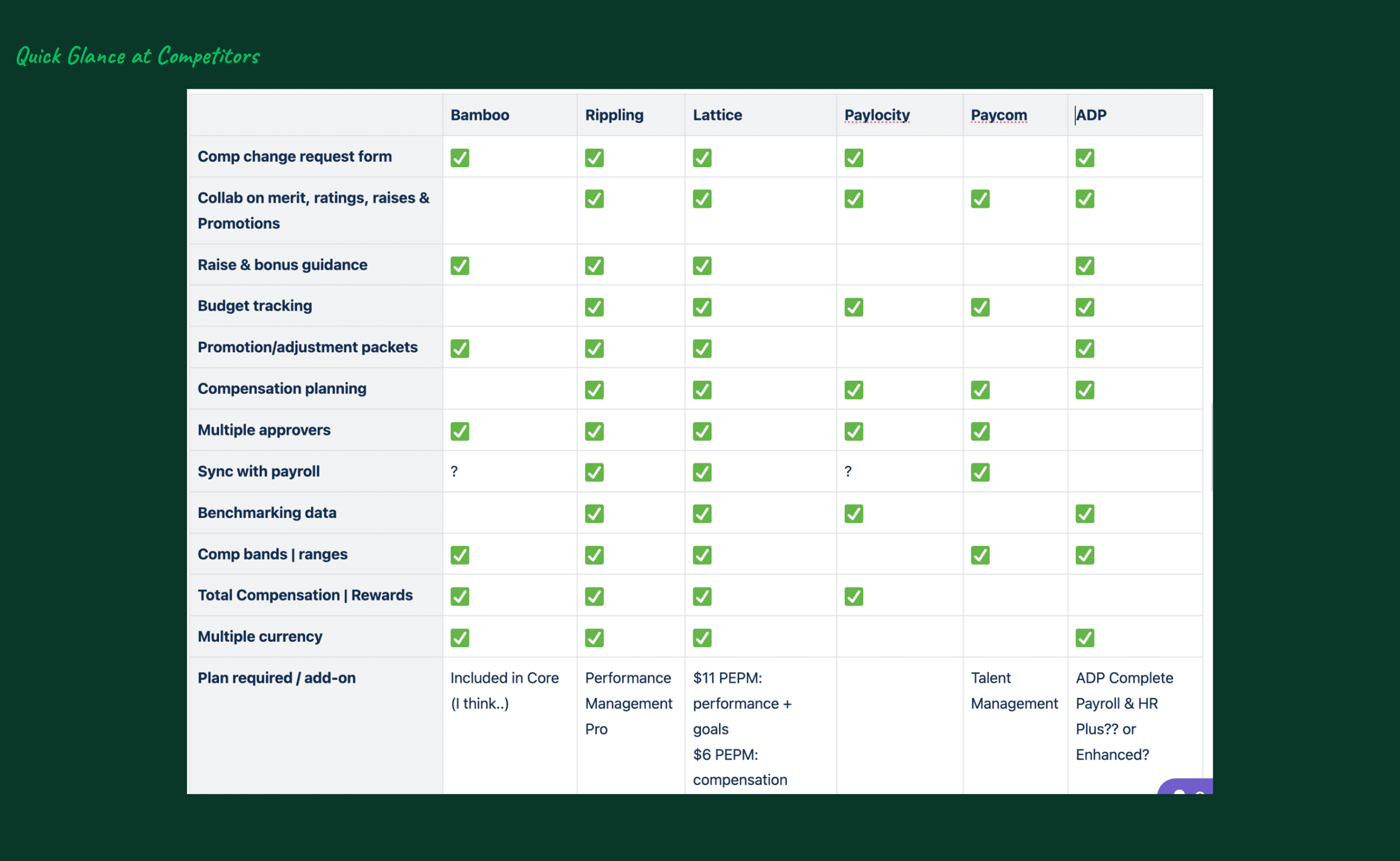
Running competitive analysis against BambooHR, Rippling, Lattice, Paylocity, Paycom, and ADP
Collaborating closely with the PM and engineering pod on scope, milestones, and trade-offs
Designing the AI summary and recommendation experience
Setting up Mixpanel tracking to measure AI feature engagement post-launch
Process & Timeline
The design process ran across a structured, multi-stage review cycle over approximately 3 months:
Brainstorm — August 2, 2024
Initial alignment on the core problem, main user stories, and the happy path. Competitive deep dives into how BambooHR, Rippling, and Lattice handle compensation workflows. Key stakeholders aligned on direction.
Storyboard Reviews — August 12 & 23, 2024
Simple, clear outlines of how the feature needed to work — focused on the happy path and prioritization decisions. Still exploratory; room to consider multiple approaches.
Spec Review — September 6, 2024
Full, robust spec reviewed with stakeholders. General direction locked. Radically changing direction becomes very difficult at this point.
Dev Review — September 27, 2024
Final spec reviewed with the engineering pod. Scope and implementation details confirmed.
Usability Testing — October 2024
Moderated testing sessions with 8 participants including 6 active GoCo clients, 1 prospect, and 1 internal team member.
Goal & Success Criteria
Centralize compensation changes into a single system
Maintain the flexibility managers expect from spreadsheets
Reduce fear by making changes visible, reversible, and reviewable
Support complex approval workflows and permissions
Provide clear context for every decision
Lay groundwork for AI-assisted insights without eroding trust
User Research
Recognition Journey Mapping
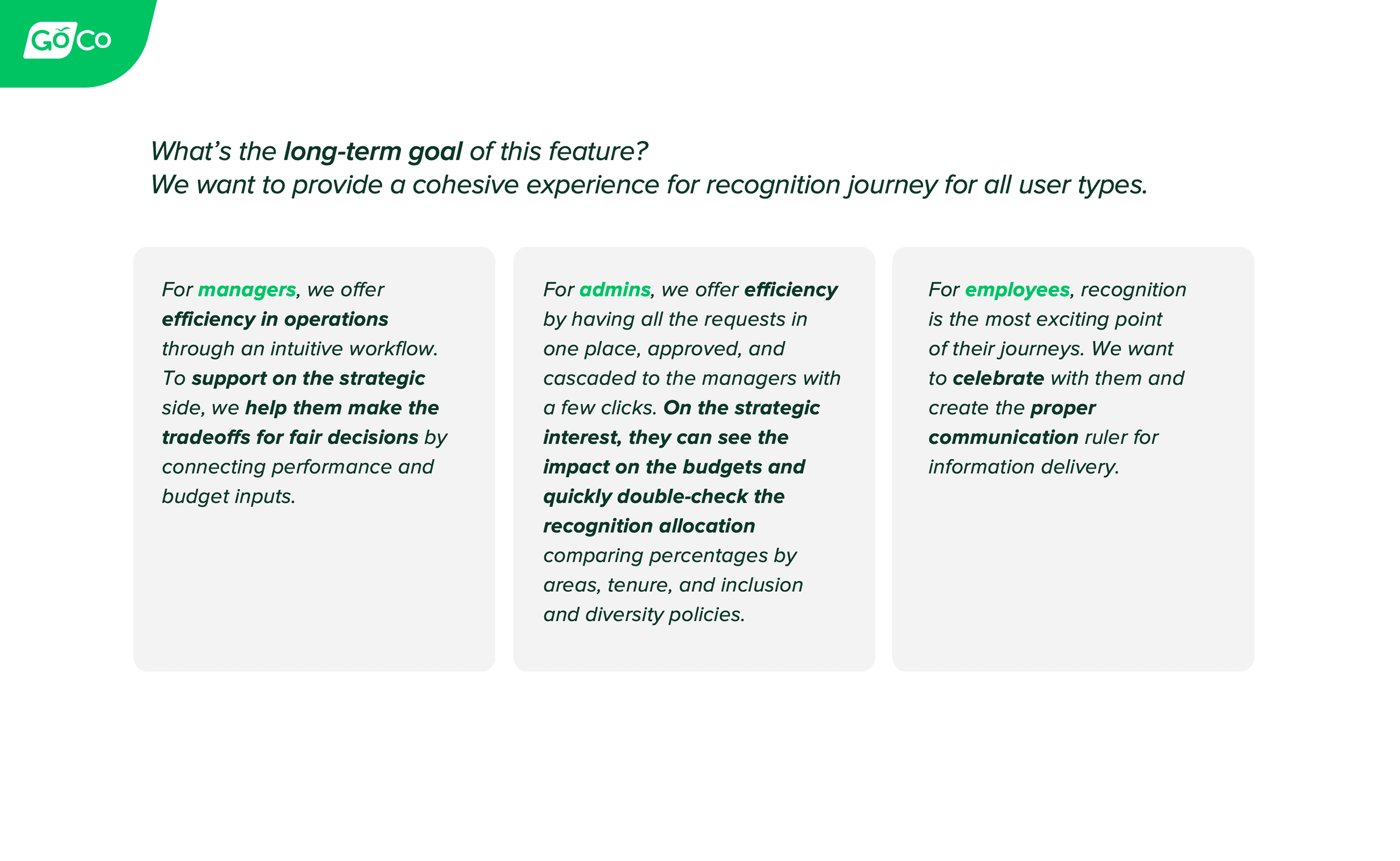
Before moving into solutions, I mapped recognition journeys for each of the three user types affected by compensation changes: employees, managers, and Full Access Admins. This helped surface where each role experienced friction — and more importantly, where their mental models diverged. Managers thought in terms of "making a request." Admins thought in terms of "reviewing a request." Designing for both meant the system had to feel natural from both directions.
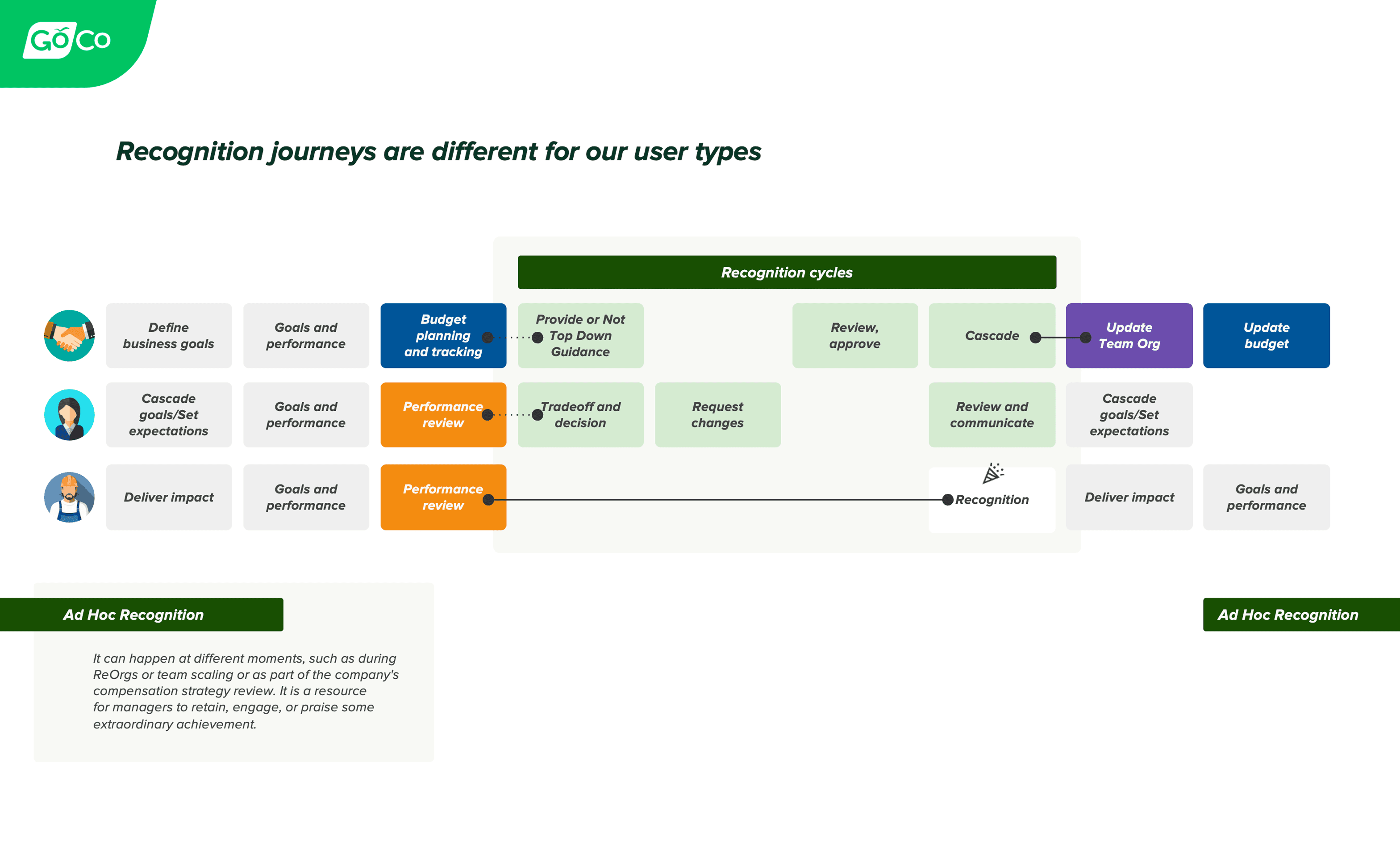
Recognition journeys were broken down for different user type.
Competitive Analysis
I conducted a deep dive into six direct competitors: BambooHR, Rippling, Lattice, Paylocity, Paycom, and ADP. A key pattern emerged: most platforms buried compensation changes inside complex wizards or multi-step forms that felt clinical and high-risk. None of them offered the inline, spreadsheet-like editing experience that managers already relied on in Excel. That gap became one of our core design bets.
Usability Testing
After the initial design was prototyped, we ran moderated usability testing sessions in October 2024 — 8 participants over 30-40 minute video sessions. Each participant walked through two core flows:
Manager flow — submitting a compensation and title change request for a direct report
Approver flow — reviewing, modifying, and approving a submitted request
Participants were HR Admins at real GoCo clients, including companies like AxisCare, WealthVest, Northwest Pipe Fittings, Charlotte City Club, and InMarket.
Design Decisions
1. Compensation Grid (Spreadsheet Familiarity with System Safety)
The central design challenge was this: managers trusted Excel because it gave them direct control and speed. But Excel had no guardrails, no audit trail, and no approval flow. We needed to preserve the mental model while adding system-level safety.
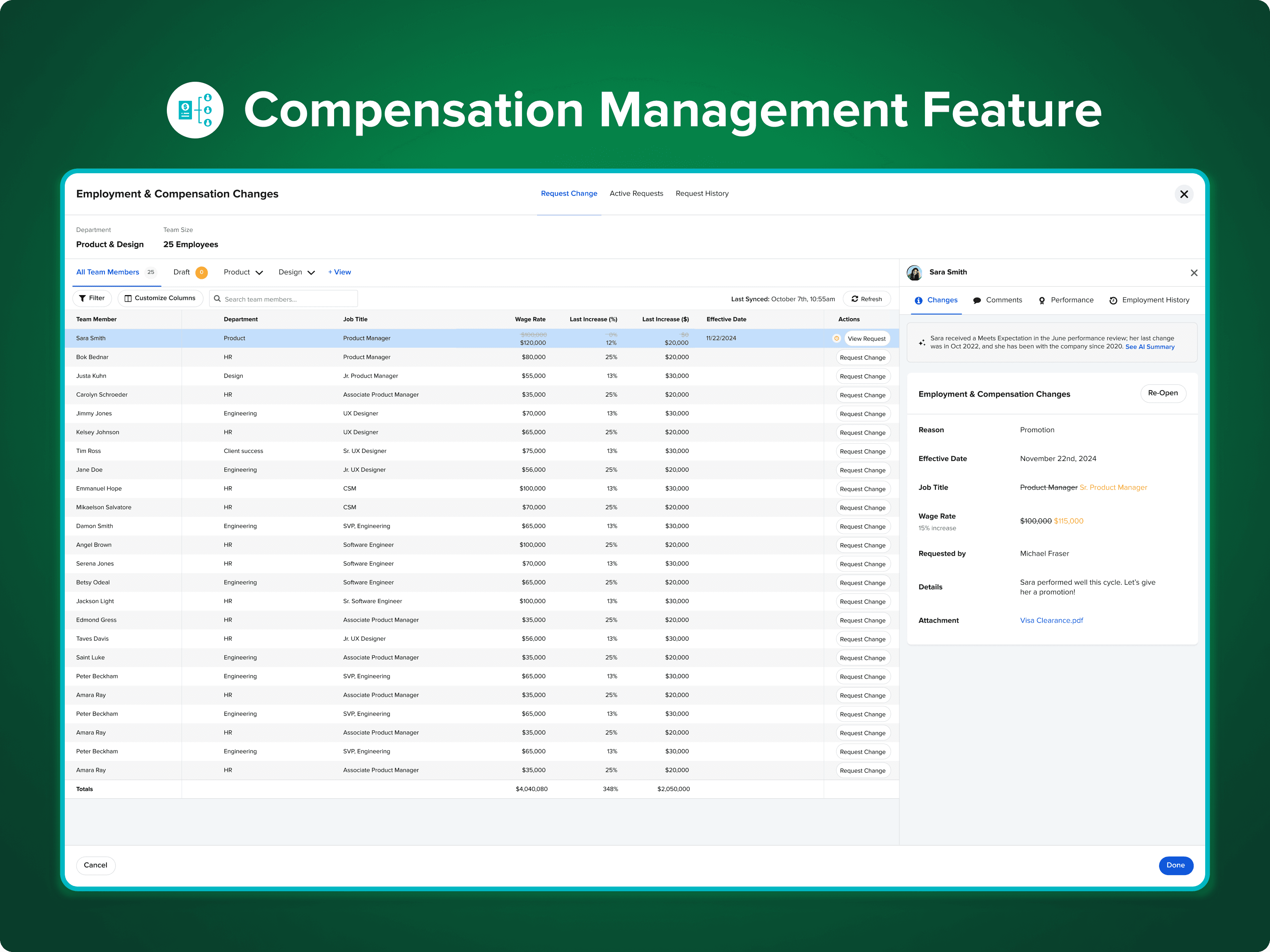
The solution was an inline-editable grid styled deliberately to feel like a spreadsheet. Managers could click directly into cells to make changes — the same gesture they were used to. But underneath, the system enforced validation, tracked every edit, and held changes in a draft state until explicitly submitted.
Key decisions:
Original values are crossed out and proposed values displayed below them, making every change immediately visible and easy to review
Cells are visually differentiated: editable vs. read-only vs. calculated fields
Real-time validation prevents invalid entries before submission
Custom column views are saved per user, so each admin or manager sees what's relevant to them
Usability validation:
Multiple participants specifically praised the Excel-like interaction. A participant (HR Admin, Northwest Pipe Fittings) said she loved being able to make changes directly in cells "similar to an Excel spreadsheet." another participant (WealthVest) called out the inline editing as a feature she was excited about and said it would help her company reduce reliance on Excel.
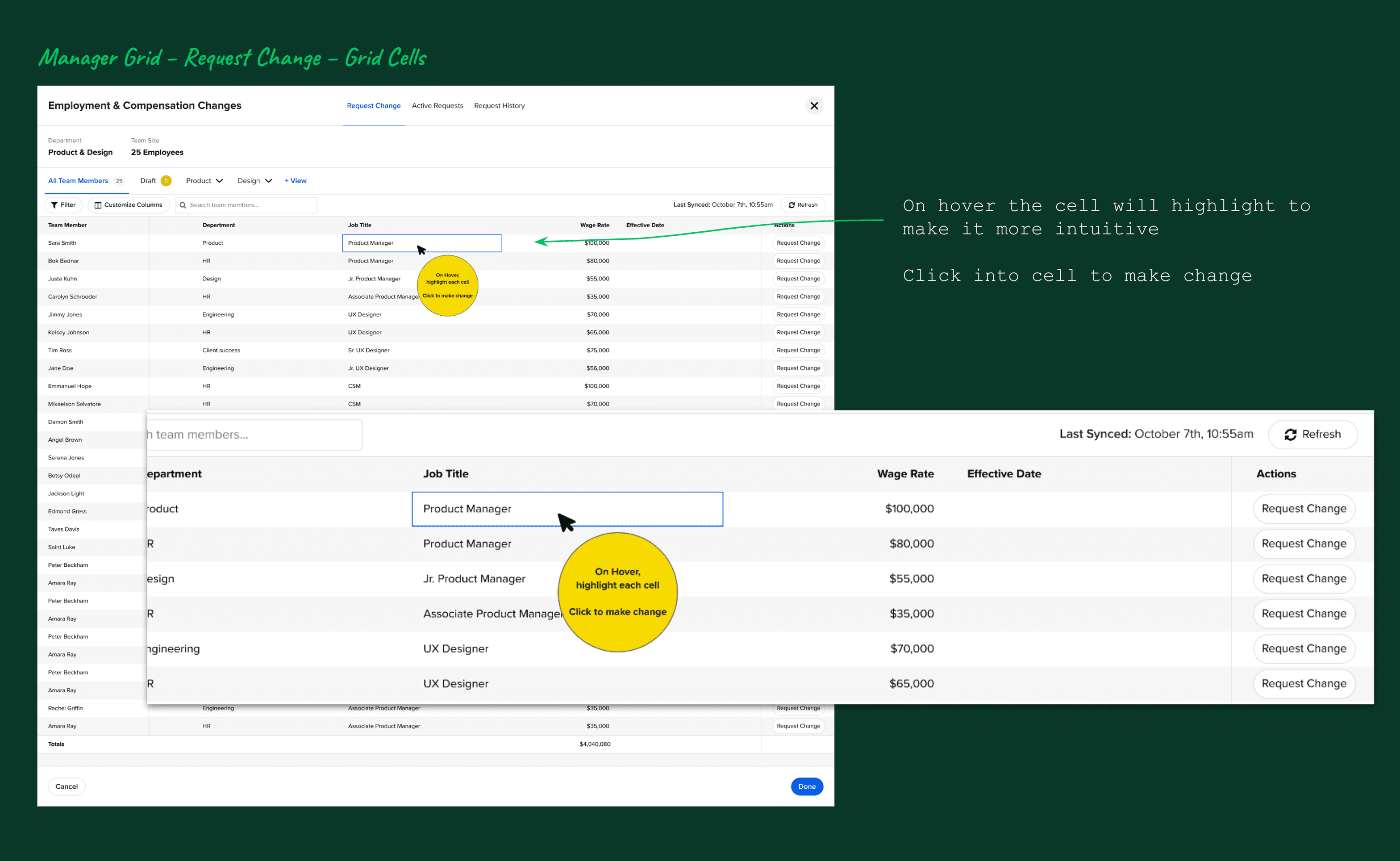
An Excel-inspired grid allows managers to propose compensation changes inline, while validations and permissions reduce error risk.
2. Draft-FirstManager Flow (Confidence Without Commitment)
One of the biggest pain points we uncovered was manager anxiety. Because the existing wizard applied changes immediately, many managers were afraid to use it at all. Our design inverted this: changes go into a draft state first, so managers can make and review their proposed updates before anything is submitted.
Key decisions:
Changes remain in "Draft" until the manager explicitly taps Submit
A clear Pending tab shows all submitted requests awaiting approval
Managers can reopen and edit a pending request up until it's been acted on
The effective date is optional for the requester and required for the approver, removing friction at the point of submission
Three entry points were designed for the manager flow: from the Compensation App grid, from an Employee Profile, and from inside a Performance Review task. This flexibility meant the tool fit naturally into how managers were already working, rather than requiring a new habit.
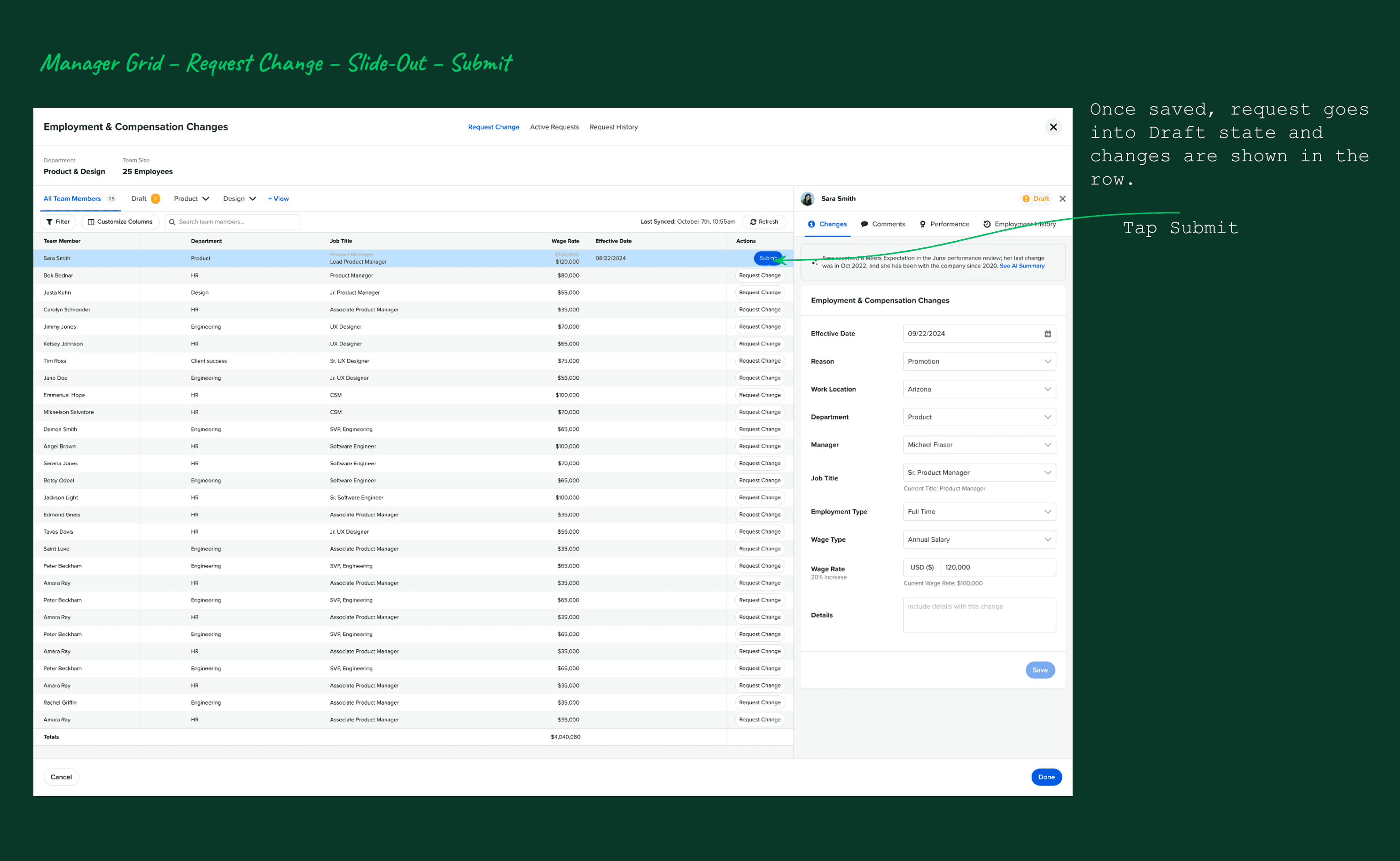
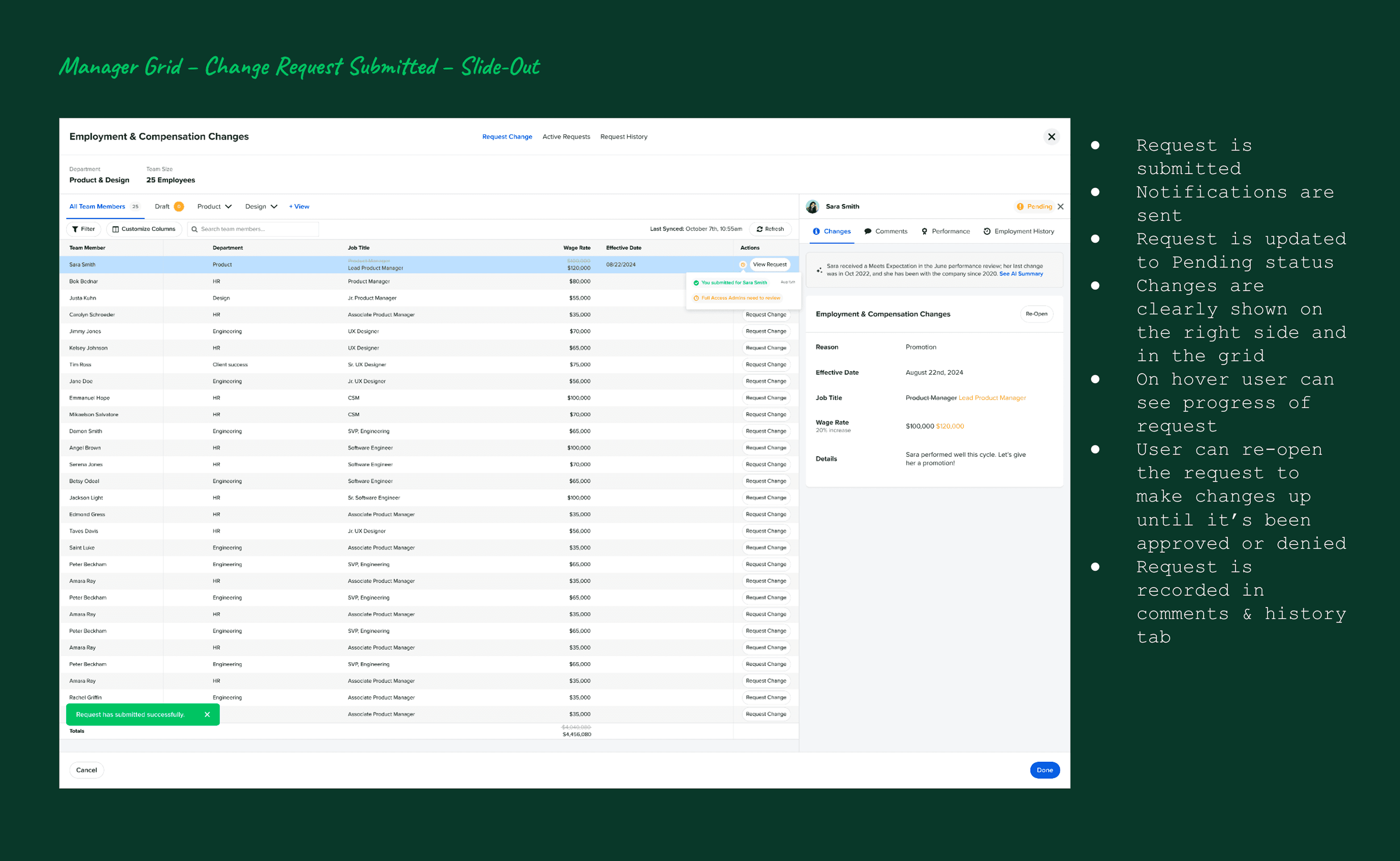
Managers can review and comment on proposed changes before submitting them for approval.
3. Context-Rich Approver Review (Informed Decisions, Not Blind Sign-Offs)
The approver experience was designed around one principle: no one should approve a compensation change without understanding why it's being requested. The slide-out panel for each request surfaces:
What changed (with the crossed-out current values vs. proposed values)
Who submitted the request and when
The employee's full employment history
All comments and notes from the requester
A complete audit trail of every edit
This meant approvers could have a genuine review conversation — not just click approve or deny without context.
Usability validations:
A participant (HR Admin, Charlotte City Club) specifically praised the ability to see all relevant employee information on one screen: "performance, employment history, comments, AI." She appreciated that approvers could edit requests, not just approve or deny — a nuance that her team's workflow required.
Improvements made after testing:
Added notification indicator (red dot) on the comments tab so approvers know when there are unread comments — multiple users didn't notice comments were available otherwise
Added a confirmation modal for approve/deny actions, with a required comment field for denials — A participant flagged that managers were approving too quickly without careful review
Clarified the visibility of the "Edit" button in the approver slide-out after 2 participant said they didn't notice it initially
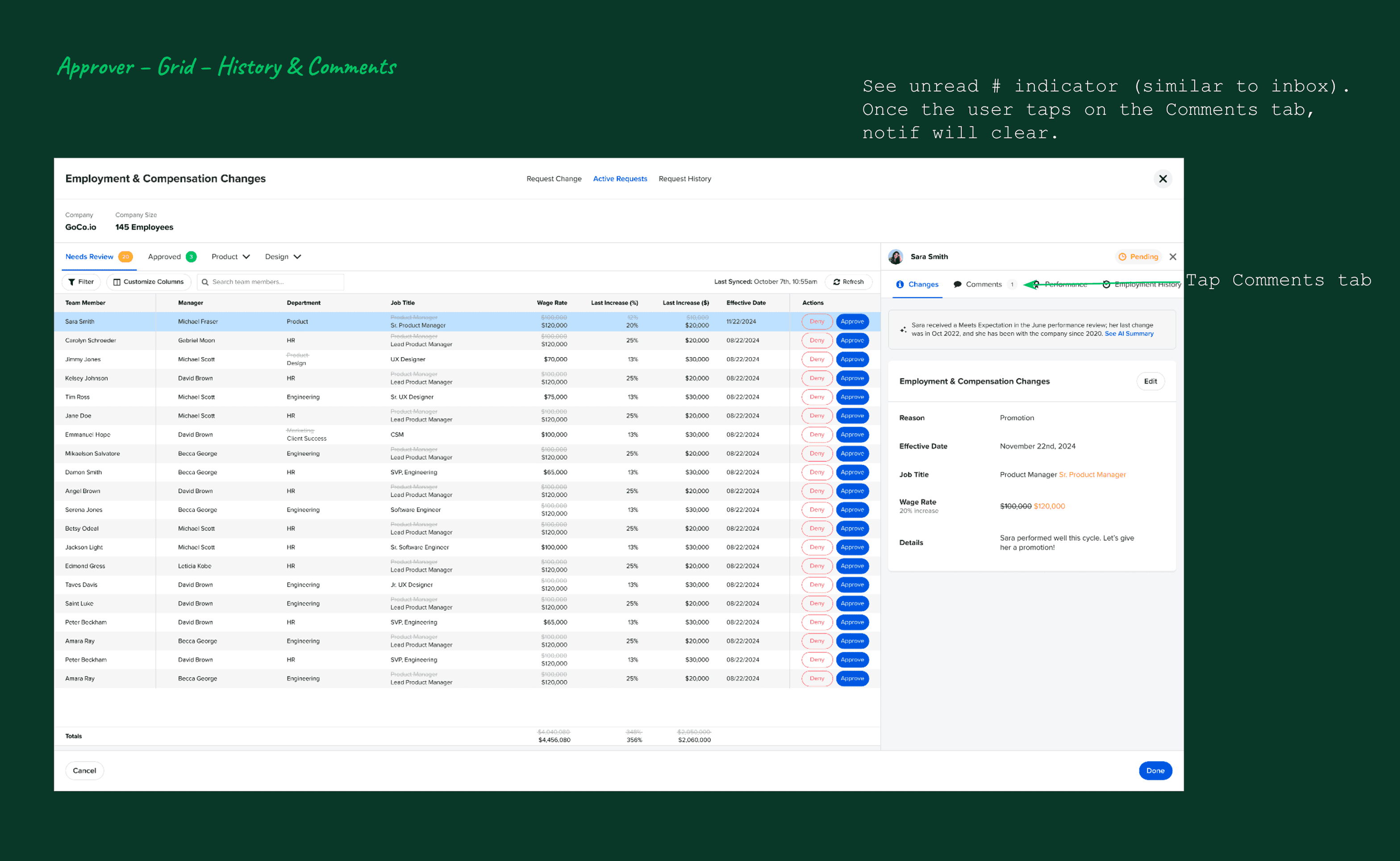
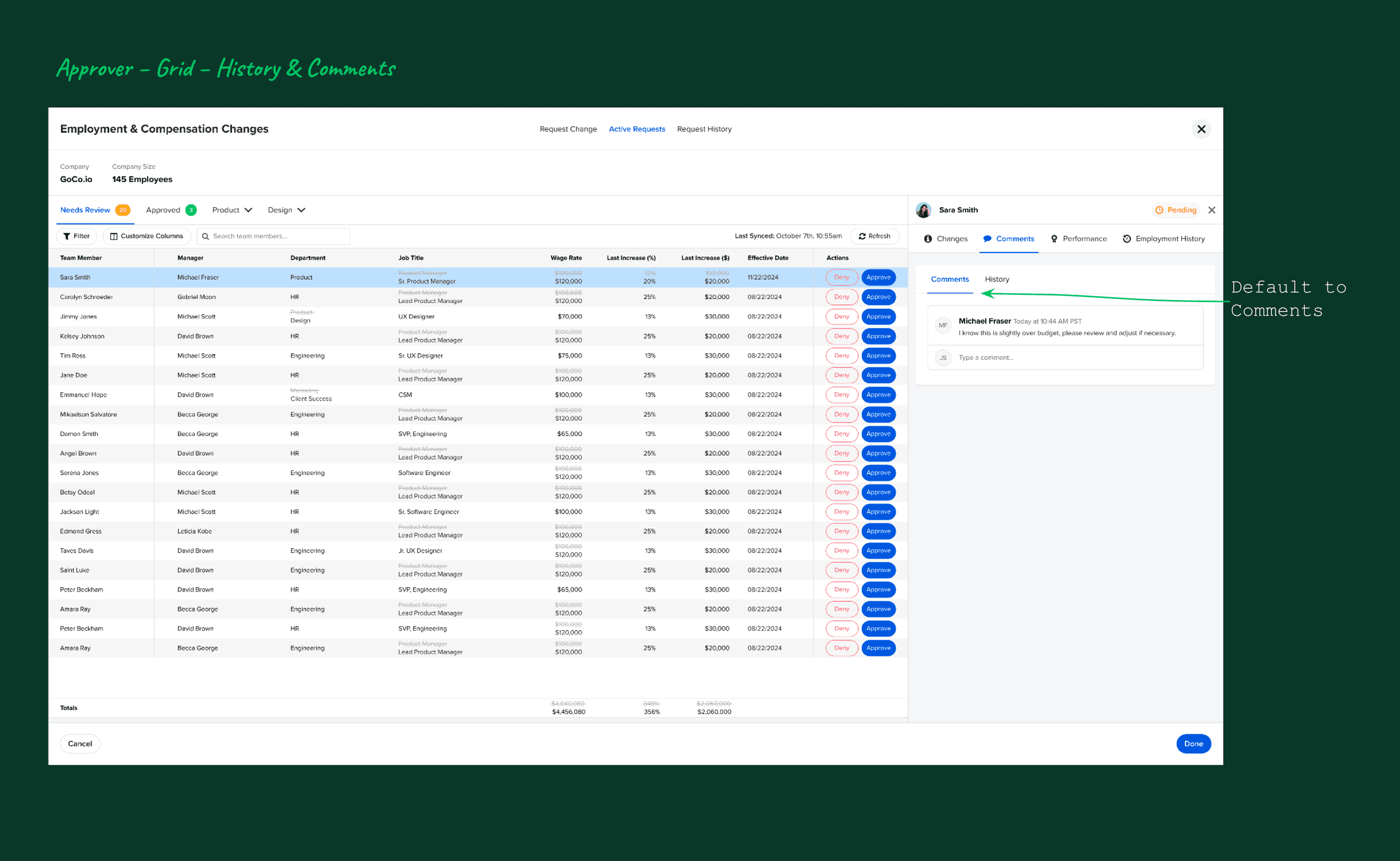
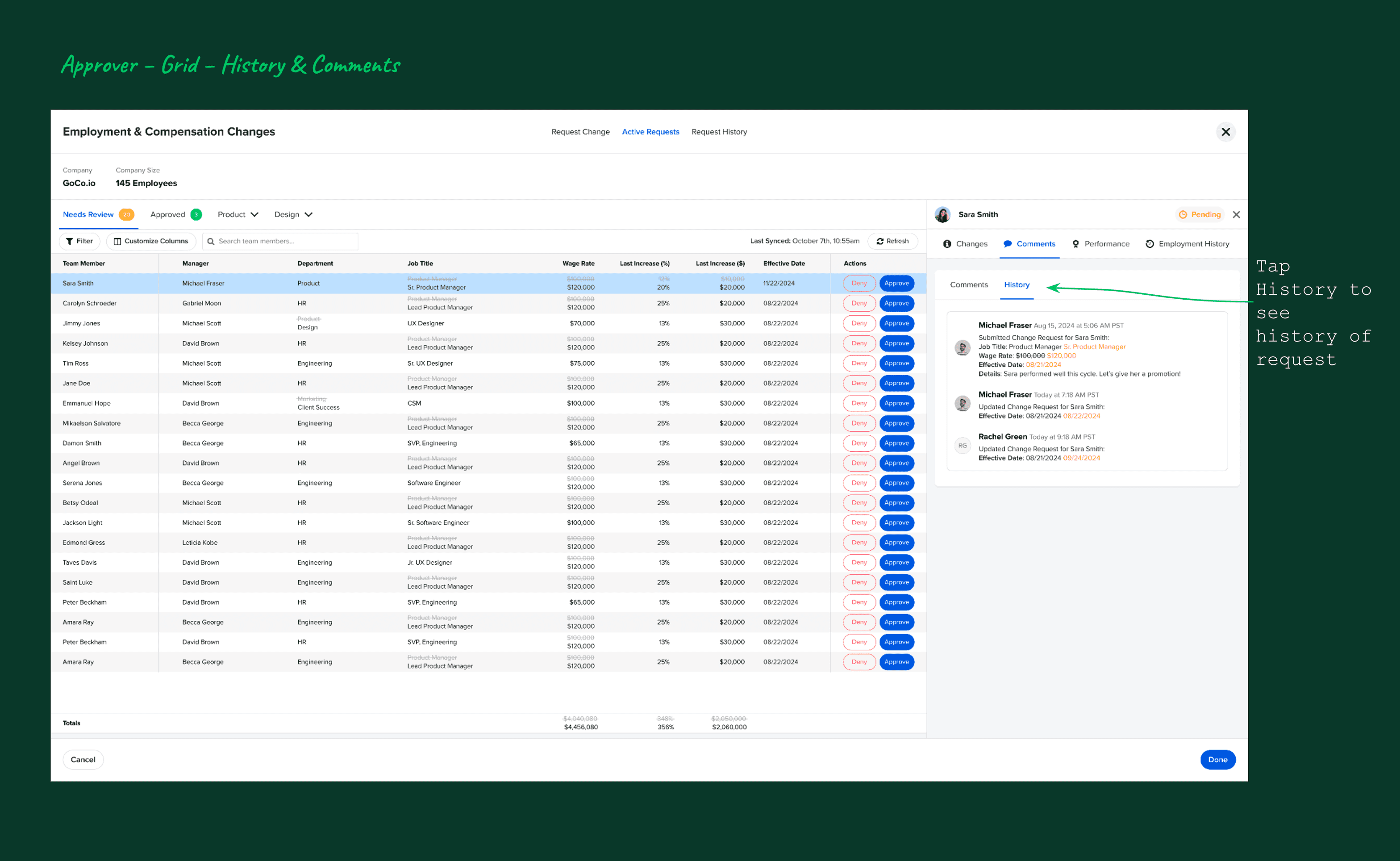
Approvers review proposed changes with full context, including comments and historical compensation data.
4. AI Summaries & Recommendations (Assist, Don’t Decide)
The AI feature was the most discussed and most positively received element across all 8 usability sessions. The design principle was clear from the start: AI should reduce cognitive load, not replace judgment.
The AI summary pulls together data from multiple sources — the employee's job title, current pay, tenure, location, performance review ratings, and employment history — and surfaces it as:
A concise narrative summary of the employee's context
Key highlights relevant to the compensation decision
Areas worth considering (not prescriptive decisions)
A recommendation framed as guidance, not instruction
Design decisions that made this work:
Clear AI labeling so users always know when they're reading AI-generated content
No auto-approval or silent changes — the AI informs, humans decide
Available to both the manager (when making a request) and the approver (when reviewing) — so both sides of the workflow benefit from the same context
Feedback mechanism built in from day one: Mixpanel tracked positive/negative feedback on AI suggestions, along with whether users left a message — giving us a signal for future model improvement
Usability validation:
A participant was "particularly impressed" with the AI feature and expressed excitement to use it. Another said her company "loves trying new AI tools" and that the recommendation feature in particular would save time for both managers and approvers. The prospect asked whether the AI could pull data from integrated apps like HubSpot — a sign of how quickly users were imagining deeper use cases.
One important trust concern surfaced: One of the participants recommended adding a privacy/security disclaimer to the AI section — which we added as a link to GoCo's AI privacy page.
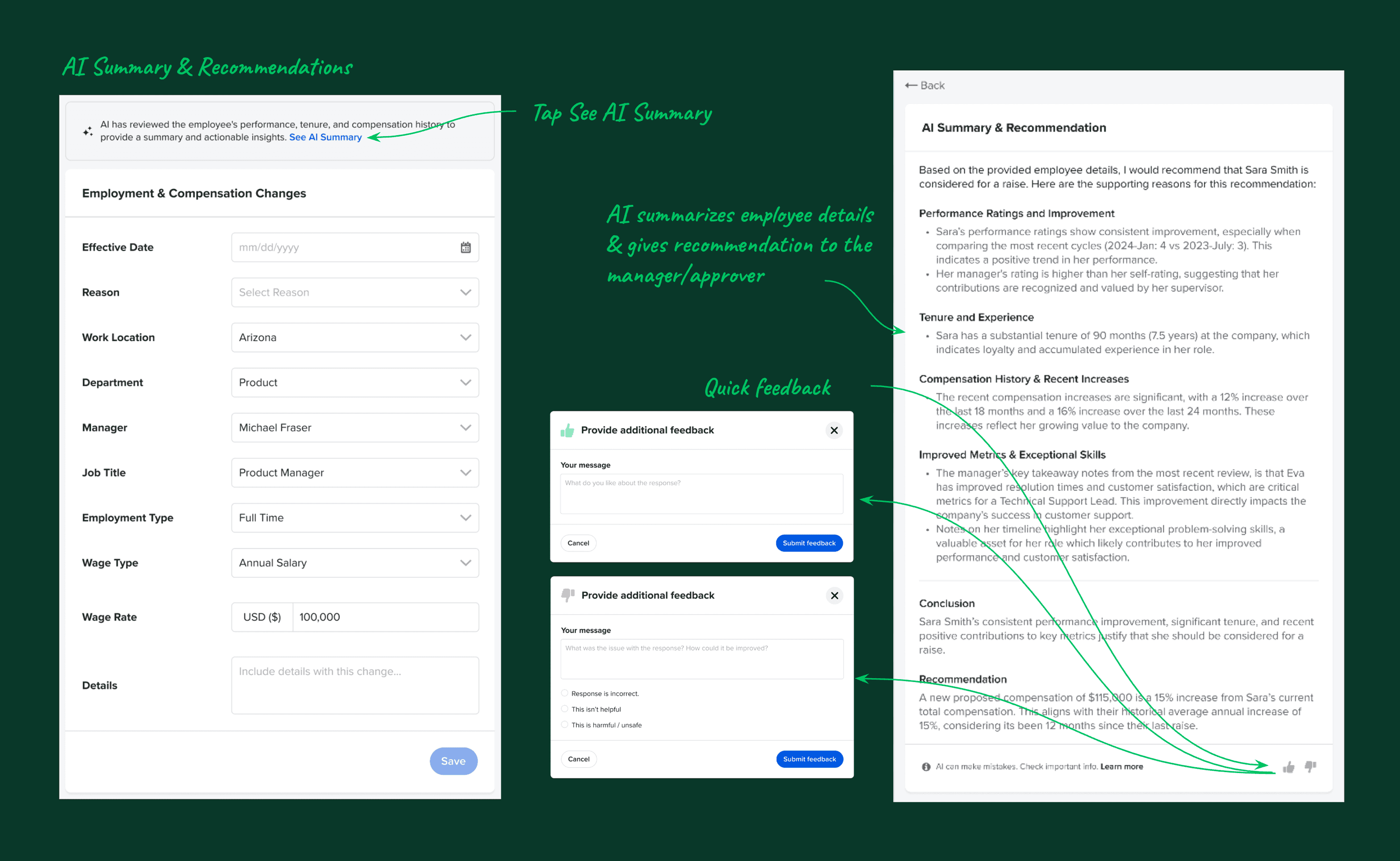
AI-generated summaries help approvers quickly understand compensation changes without removing human oversight.
5. Conflict Handling (Make Problems Visible, Not Silent)
In multi-user workflows where multiple managers or admins can interact with the same employee's data, edit conflicts are inevitable. Rather than silently overwriting changes or throwing a generic error, we designed an explicit conflict surface: visual indicators flag when changes overlap, a centralized conflict review view lets admins see exactly what's in conflict, and clear resolution paths preserve all edits until a human makes a decision.
This design decision was about trust. Silent overwrites erode confidence in the system — especially for something as sensitive as compensation data.
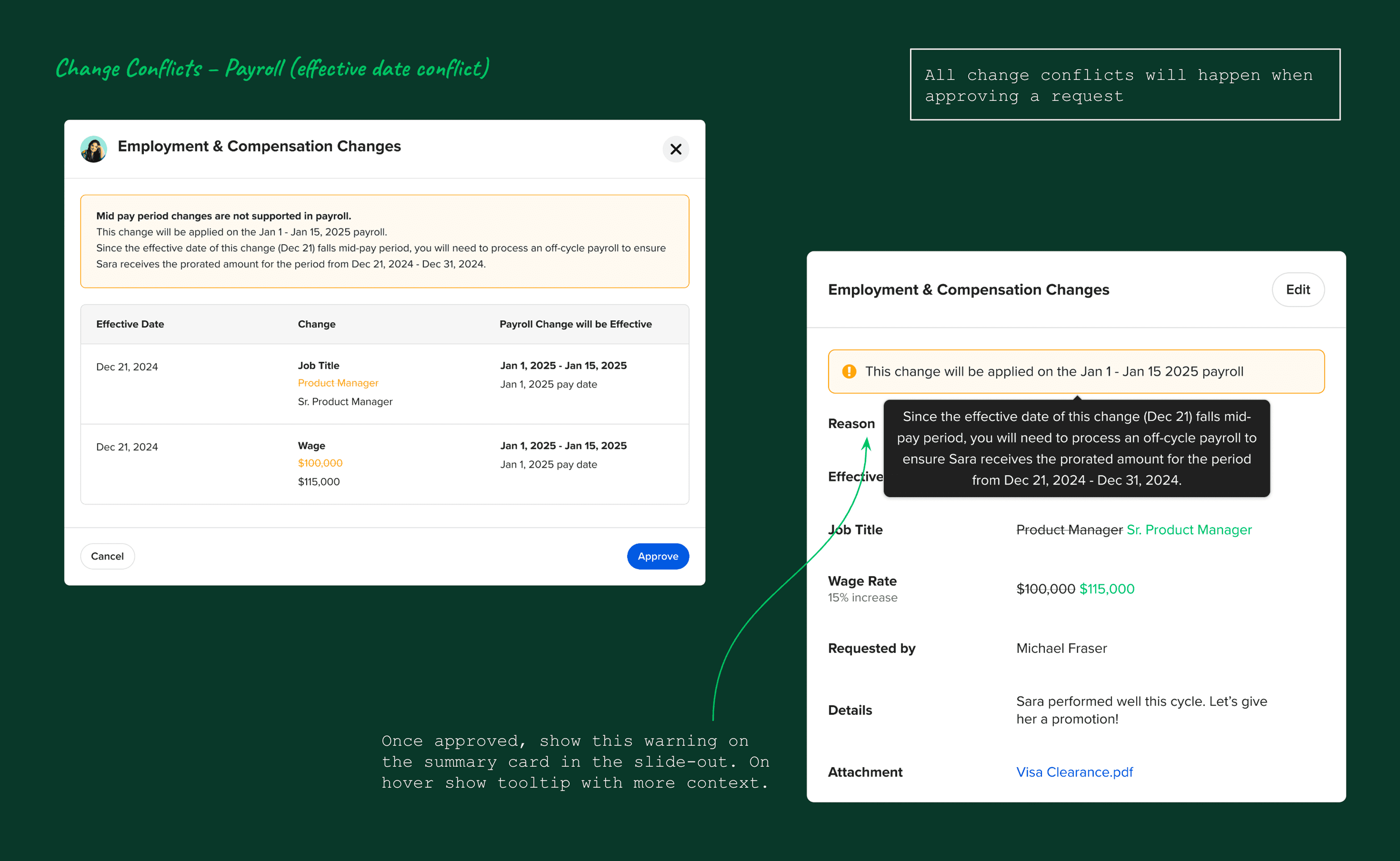
Conflicting compensation changes are surfaced clearly, allowing admins to resolve issues before approval.
Usability Testing Analysis
Outcomes
Usability Score
8/8
All participants rated the experience intuitive and straightforward
AI Reception
100%
Every usability session participant reacted positively to the AI feature
Adoption Target
10%
User adoption within first 6 months — target was met
What usability testing validated:
8 out of 8 participants described the experience as intuitive and straightforward — a 100% positive usability rate across real active clients
All participants reacted positively to the AI feature — it was called out as a differentiator in every session
The grid-based interaction immediately reduced friction — no participant struggled with the core task of submitting a change request
Participants consistently said the feature would replace their current process (email, Excel, or the old wizard) validating the core problem we set out to solve
What the feature unlocked for GoCo:
Feature met its 10% user adoption target within the first 6 months — driven by strong client demand and ease of use
A foundation for future compensation benchmarking and budget planning features (multiple participants explicitly asked for this — signaling clear product-market fit for the next phase)
Expanded Mixpanel tracking on AI engagement, giving the team real adoption data to iterate on
Strong competitive positioning against Rippling, BambooHR, and Lattice — all of whom lacked the inline grid + AI combination
A new entry point for compensation workflows inside Performance Reviews, tying the two features together and increasing the stickiness of both
Overall Validation
Across sessions, participants consistently described the experience as:
Clear
Safer than current tools
Less stressful
More transparent
One participant summarized it best:
“This is worlds better than what we’re doing now.”
This feedback reinforced that the feature successfully balanced flexibility with control — the core challenge of compensation workflows.
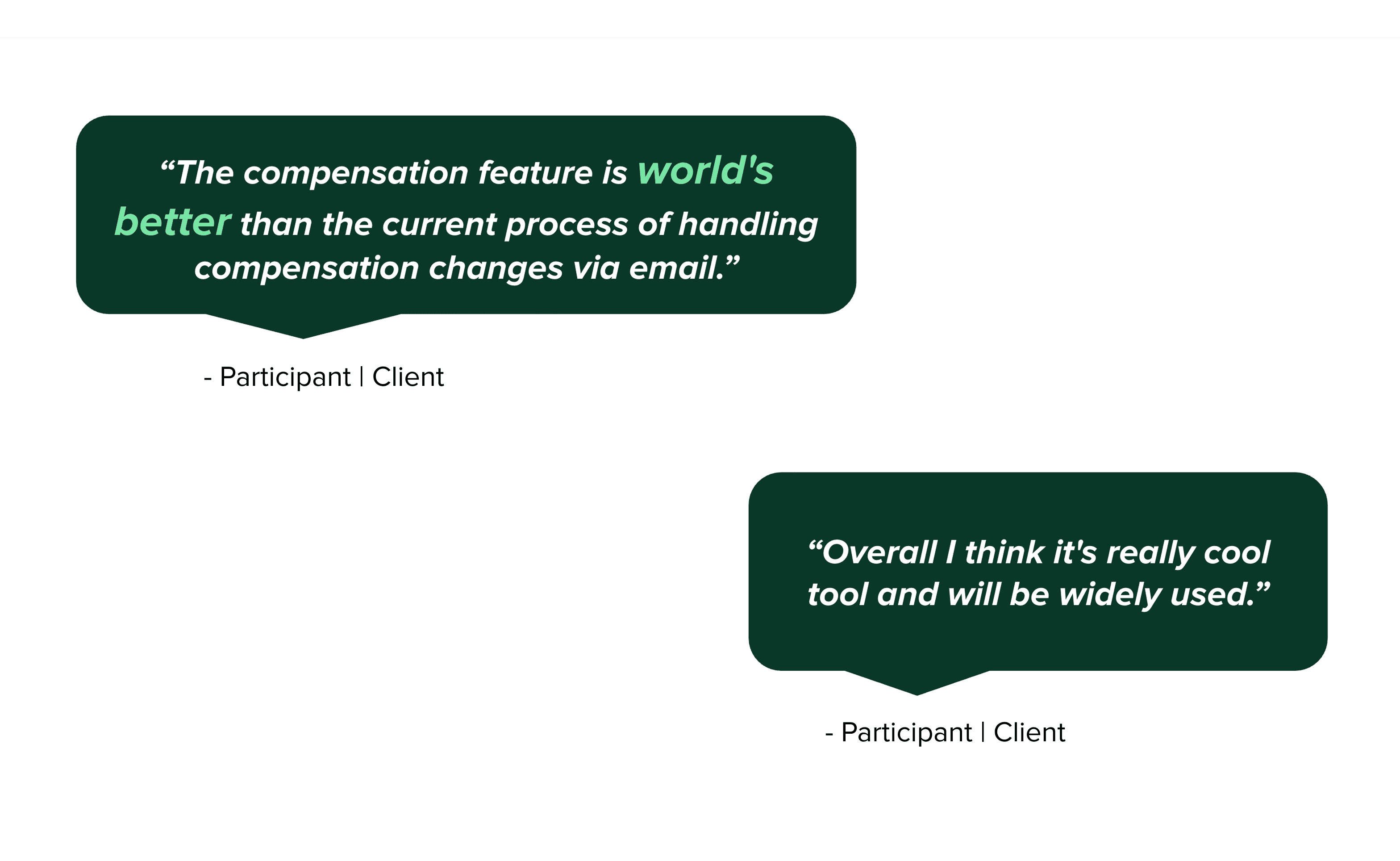
Users quickly understood how to interact with the compensation grid due to its spreadsheet-like structure.
Learnings & Next Steps
Key Learnings
Familiar patterns lower fear in high-risk workflows. The spreadsheet mental model wasn't just a design choice — it was the key to unlocking manager confidence. Matching what users already trusted made the new system feel approachable instead of intimidating.
Visibility and auditability matter as much as speed. Every participant who praised the feature mentioned something about transparency: seeing what changed, who changed it, why it was requested. In compensation workflows, the feeling of control is as important as the tool's actual capabilities.
AI earns trust through restraint. The AI feature resonated because it explained without deciding. Every framing choice — the language, the positioning, the labeling — was designed to keep the human in control. The moment AI feels like it's making decisions for you, trust collapses.
Small clarity issues get amplified in complex, high-stakes systems. A hard-to-find comment tab, a button that blends into the background, a confirmation step that's missing — in a low-stakes tool, these are minor annoyances. In a compensation tool where one click approves a salary change, they become real risks. Usability testing at prototype stage, before launch, was essential.
Final Takeaway
Designing compensation tools isn’t about moving faster — it’s about helping people make confident decisions. Every design choice in this feature was made in service of that goal: reducing anxiety, surfacing context, preserving flexibility, and keeping humans in control even when AI is in the room.
The result was a feature that felt less like HR software and more like a trusted partner in an important process.
By combining familiar interaction patterns, strong system safeguards, and carefully positioned AI assistance, this feature transforms a stressful, error-prone process into one that feels controlled, transparent, and trustworthy.