Integrating Goal Tracking into GoCo’s Performance Management Feature
How I designed a scalable, end-to-end goal tracking system — giving employees, managers, and admins a single place to set, track, and connect goals directly to performance reviews, with AI-powered summaries built in.
Company
GoCo.io
Role
Lead Product Designer
Timeline
March - November 2024
Tools
Figma, Jira, Mixpanel, FullStory
Context
Overview
GoCo's Performance Management feature already helped small businesses run structured employee reviews. But there was a critical gap: goals lived outside the system entirely. Teams were tracking employee goals in spreadsheets, sticky notes, and email threads — disconnected from the reviews that were supposed to evaluate progress against them.
This created a broken feedback loop. By the time a performance review arrived, managers were working from memory rather than documented progress. Employees had no visibility into how their work mapped to company objectives. And HR admins had no way to report on goal completion across the organization.
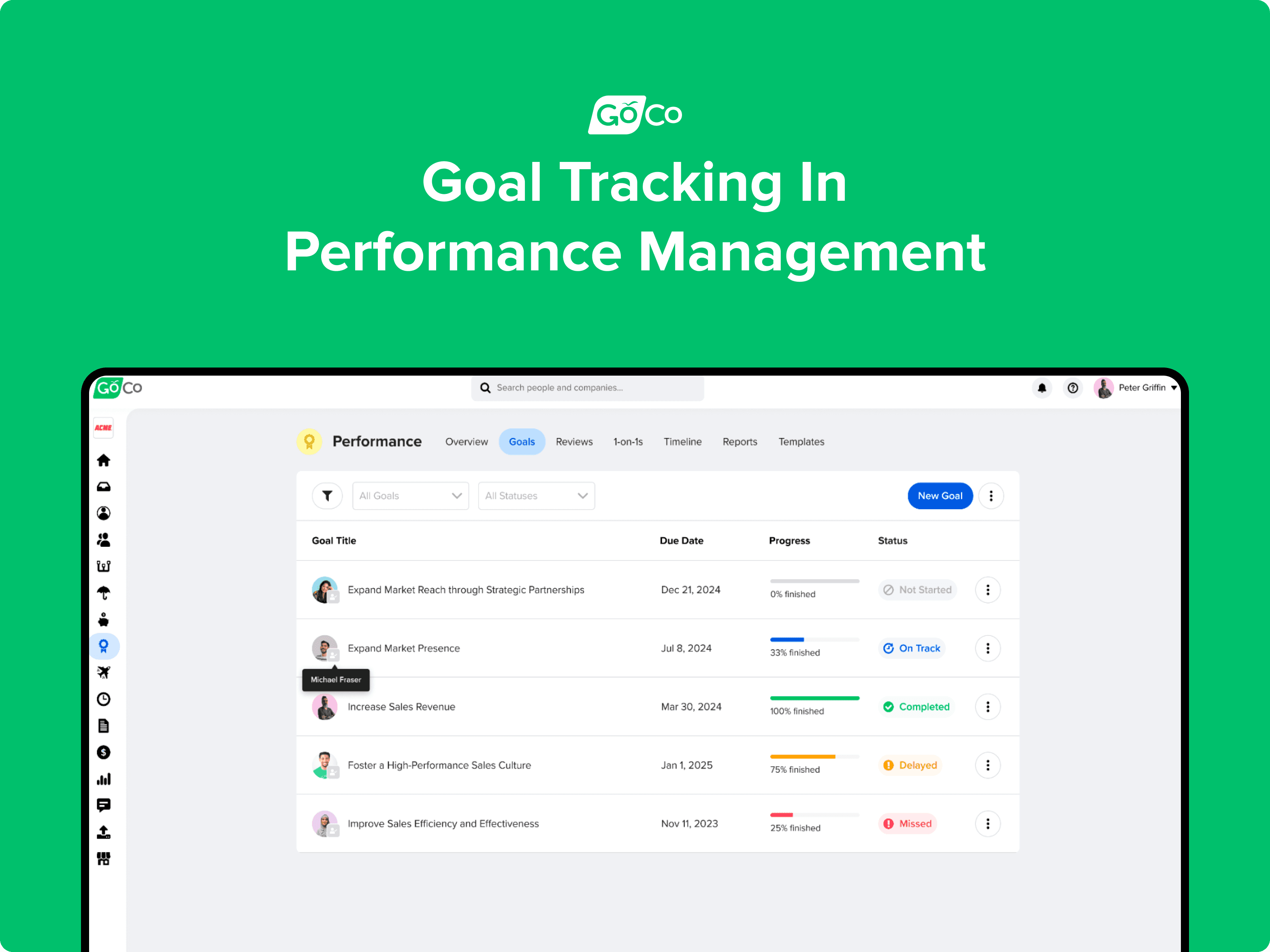
This case study covers how I led the end-to-end design of the Goals feature inside GoCo's Performance Management app — a new, centralized system for setting, tracking, and reviewing individual goals — with AI-powered summaries integrated directly into the review experience.
Problem
In discovery and stakeholder alignment, three core problems shaped the design direction:
1. No centralized place for goals: Organizations were managing employee goals through spreadsheets and fragmented tools, leading to poor visibility, missed deadlines, and no accountability. Managers couldn't see progress without manually chasing updates from their reports.
2. Goals were disconnected from performance reviews: Even when goals existed, they lived in a different tool — or a different tab — from the reviews that evaluated them. Managers had to context-switch constantly during review season, and reviews often reflected memory rather than actual, documented progress.
3. Individual work wasn't connected to organizational objectives: Without a structured system, employees didn't understand how their goals tied to team or company priorities. This reduced motivation and made it harder for leadership to measure whether the organization was moving in the right direction.
My Role
I was the lead product designer on this feature, working end-to-end from initial spec through to launch. I owned the full design across three distinct user roles — employees, managers, and admins — and collaborated closely with the PM and the engineering pod on scope, milestones, and trade-offs.
My specific responsibilities included:
Translating product requirements and user stories into detailed UX flows and high-fidelity specs
Designing the goal creation experience including the optional SMART framework and milestone tracking
Designing dashboards for three different user roles with appropriate permissions and visibility
Designing the goal status system including automated and manual status transitions
Integrating goals into the performance review flow — including the "frozen in time" logic
Designing four AI summary experiences (goals, reviews, timeline, employment history)
Setting up Mixpanel event tracking to measure adoption and AI engagement post-launch
Running client feedback sessions with companies including Emerald Lawn Care and ThriveWorks
Process & Timeline
The design followed GoCo's structured spec review process:
Problem Alignment — Early March 2024: Initial brainstorm focused on the core problem, main user stories, and the happy path. Competitive deep dive into how BambooHR, Rippling, and Lattice handle goal tracking — a key finding was that BambooHR's implementation caused user confusion, which informed our own design decisions.
Spec — March 21, 2024: Full spec developed covering all user roles, user stories, milestone tracking, status logic, notification system, permissions, and the AI summary integration. Reviewed and approved by PM and key stakeholders.
Design & Engineering Collaboration — April–October 2024: Feature delivered in milestones (M1 through M7), from core goal creation through to profile integration, home page cards, and timeline visibility. Close collaboration with the engineering pod throughout.
Client Feedback — November 2024: Feedback sessions with active clients including Emerald Lawn Care and ThriveWorks provided real-world validation of the feature post-launch.
Goals & Success Criteria
Deliver competitive parity with leading HR platforms
Enable employees and managers to easily create and manage goals in one place
Improve real-time visibility into progress for managers and admins
Integrate goals directly into performance reviews
Drive 10% user adoption within the first 6 months
Lay the foundation for future enhancements: Team Goals, Company Goals, and OKRs
Mixpanel tracking was set up from day one to measure: goal creation (with/without SMART framework, with/without milestones), goal completion, progress updates, notification engagement, and AI summary interactions.
Solution / Design Decisions
User Stories
The spec covered three distinct user types, each with different needs and permissions:
Employees: needed to create personal goals, track their own progress, and reference those goals inside their performance reviews. They could create goals with milestones, update progress manually or through milestone completion, and add comments for context.
Managers: needed visibility across all their direct and indirect reports' goals — not just their own. They needed to create goals for their team members, track team-wide progress, filter by status or team member, and review goals in context during performance review cycles.
Admins (Full Access Admins): needed full visibility and configurability — including setting up which fields managers could access, configuring notifications, running reports on goal data, and embedding the Goals app into performance review workflows.
User stories were broken down and prioritized by milestone (M1–M7), allowing the team to ship the highest-value functionality first and expand in subsequent releases.
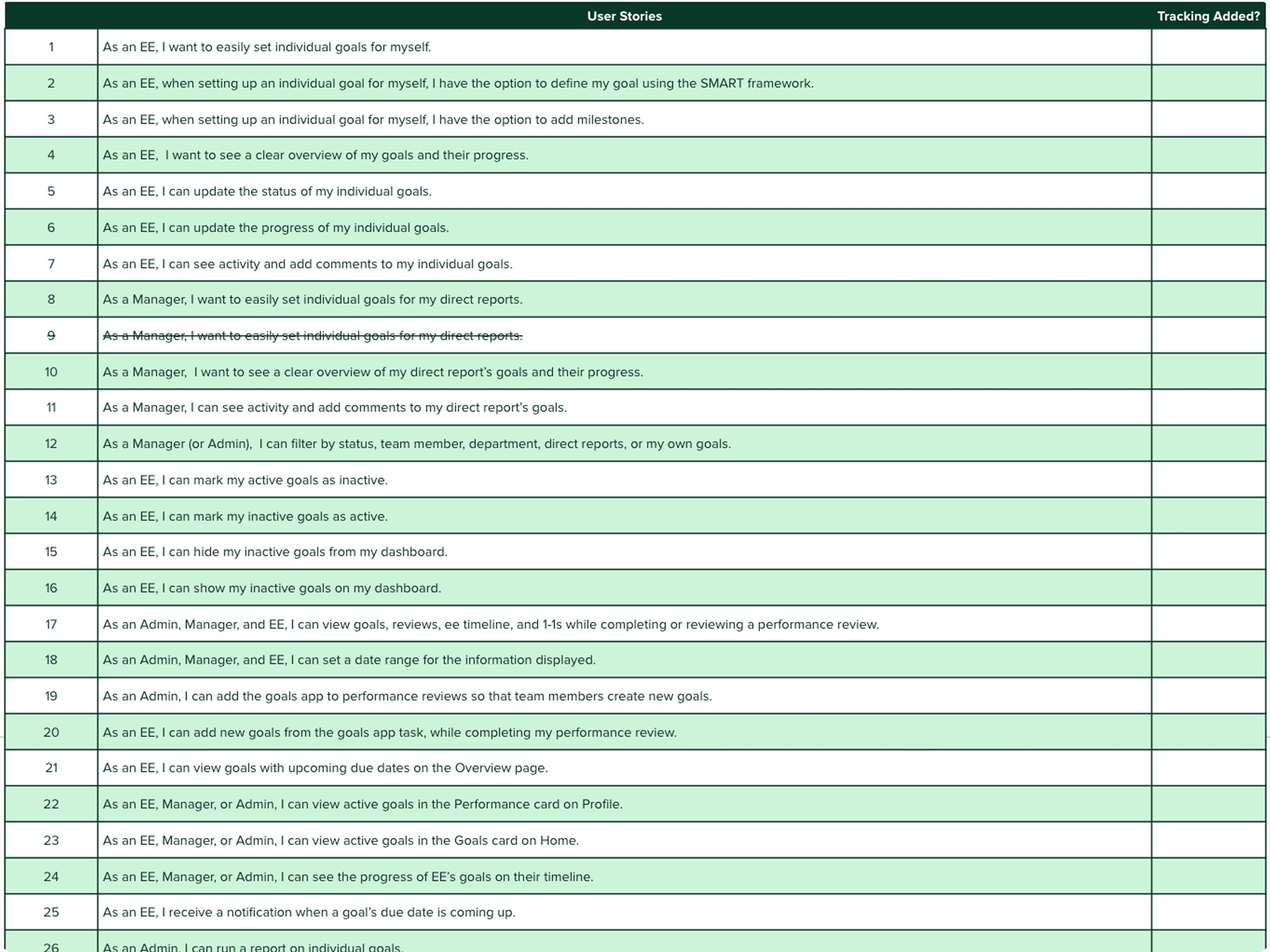
User stories were broken down to better understand and evaluate the complexity of each requirement.
1. Goal Creation – Flexible Enough for Everyone
One of the earliest design decisions was how to handle goal creation without making it feel heavy or bureaucratic. Different teams have different levels of goal-setting maturity — some use formal OKR frameworks, others just need a simple title and due date.
The solution was a layered creation experience:
Required: Goal title only — the minimum needed to get started
Optional: Description and due date — for teams that want more structure
Optional: SMART framework — Specific, Measurable, Achievable, Relevant, Timebound — for teams that want to go deeper
Optional: Milestones with metric types (Done/Not Done, Numeric, or Percentage) — for goals that need granular progress tracking
This meant a manager doing a quick ad hoc goal could create one in seconds, while a team running structured OKR cycles could use the full SMART + milestone experience. Neither group had to work around the other.
A key UX detail: the SMART Timebound field and the top-level due date field are synced — setting one automatically populates the other. This prevents the common confusion of having two date fields that conflict with each other.
Design decision on SMART: SMART criteria are optional and non-blocking. Teams with lower maturity can adopt structured goal-setting at their own pace without being forced into a framework they're not ready for.
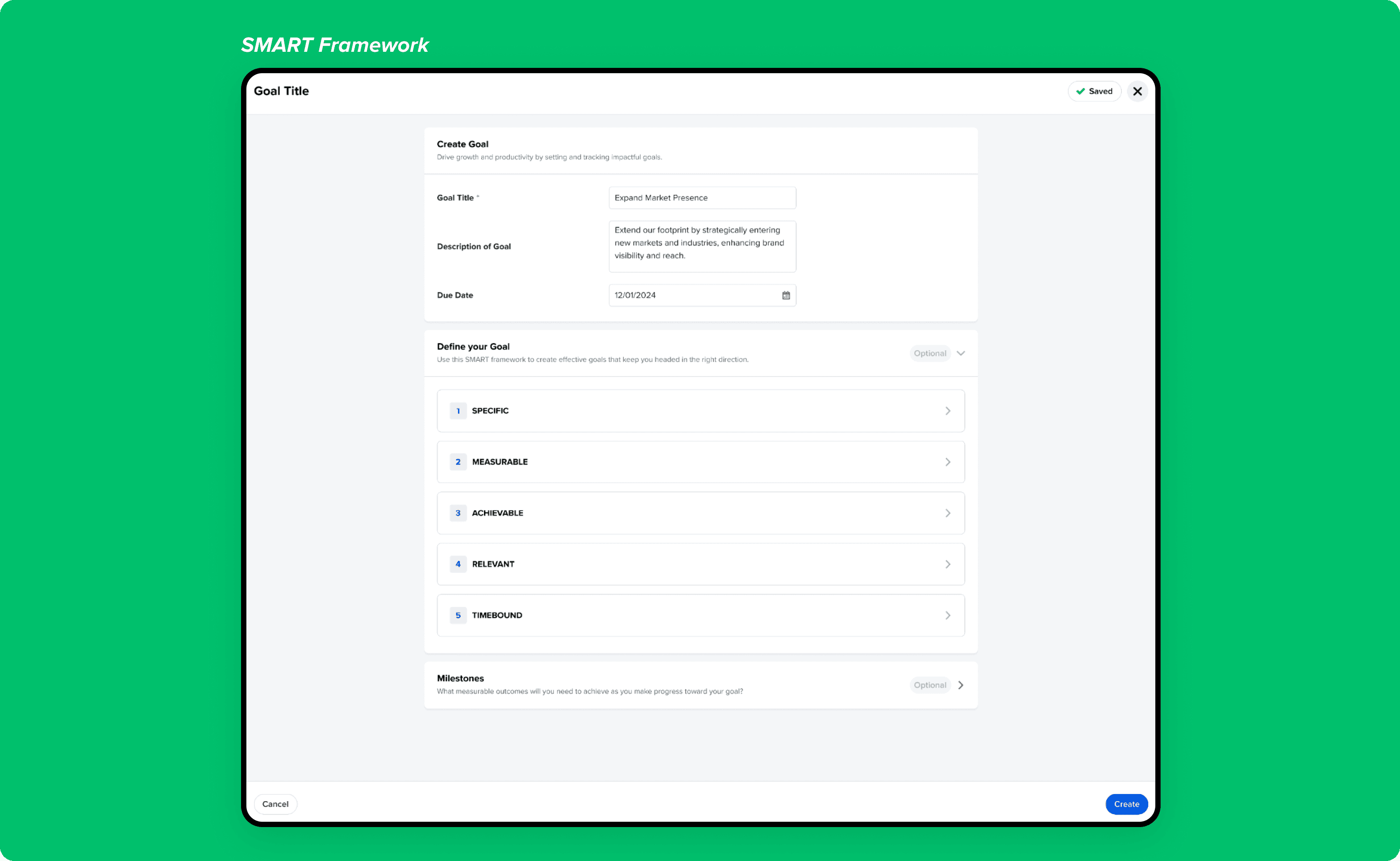
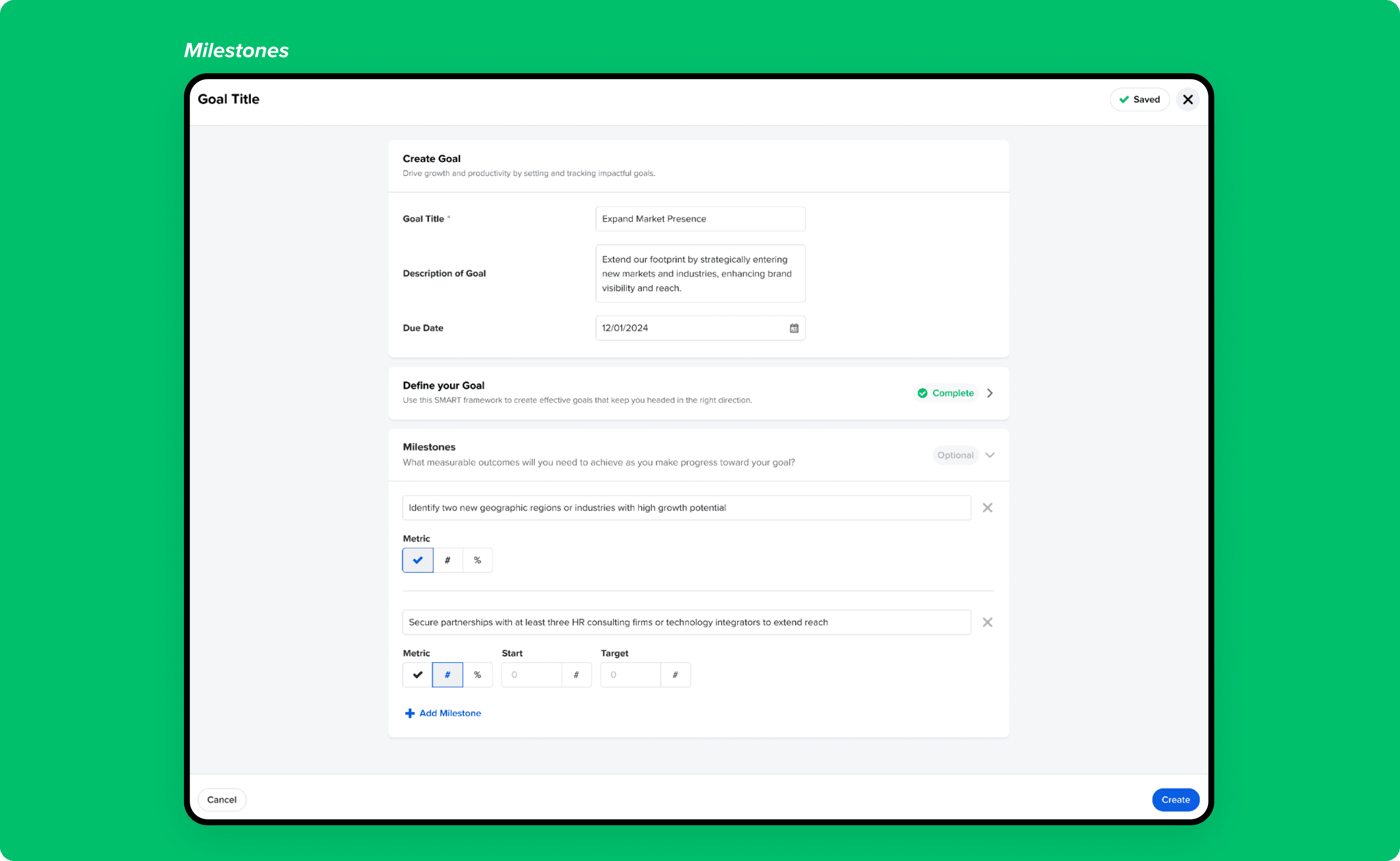
SMART criteria are optional and non-blocking, allowing teams with different maturity levels to adopt structured goal-setting at their own pace.
Introduced milestone-level tracking with multiple metric types so progress reflects real work, not just a single completion checkbox.
2. Goal Status System – Automation with Human Override
The status system was one of the more technically nuanced design challenges. We needed statuses that kept themselves accurate without requiring constant manual updates — but also gave users the ability to override when real-world context demanded it.
The five statuses and their logic:
Not Started: Auto-assigned when a future start date is set in the SMART Timebound field
On Track: Auto-assigned when start date is today, in the past, or not set
Completed: Auto-assigned when all milestones are checked and progress bar reaches 100%
Delayed: Never auto-assigned — always manually set by the user
Missed: Auto-assigned when the due date passes and the goal is not complete
The key design decision here was "Delayed" — deliberately keeping it manual. Delayed is a judgment call, not a calculation. A goal might be delayed for a good reason (scope change, team restructuring) that the system can't know. Forcing auto-assignment would have surfaced false signals and eroded trust in the status data.
Users who created a goal can always manually override any auto-assigned status, preserving human judgment throughout.
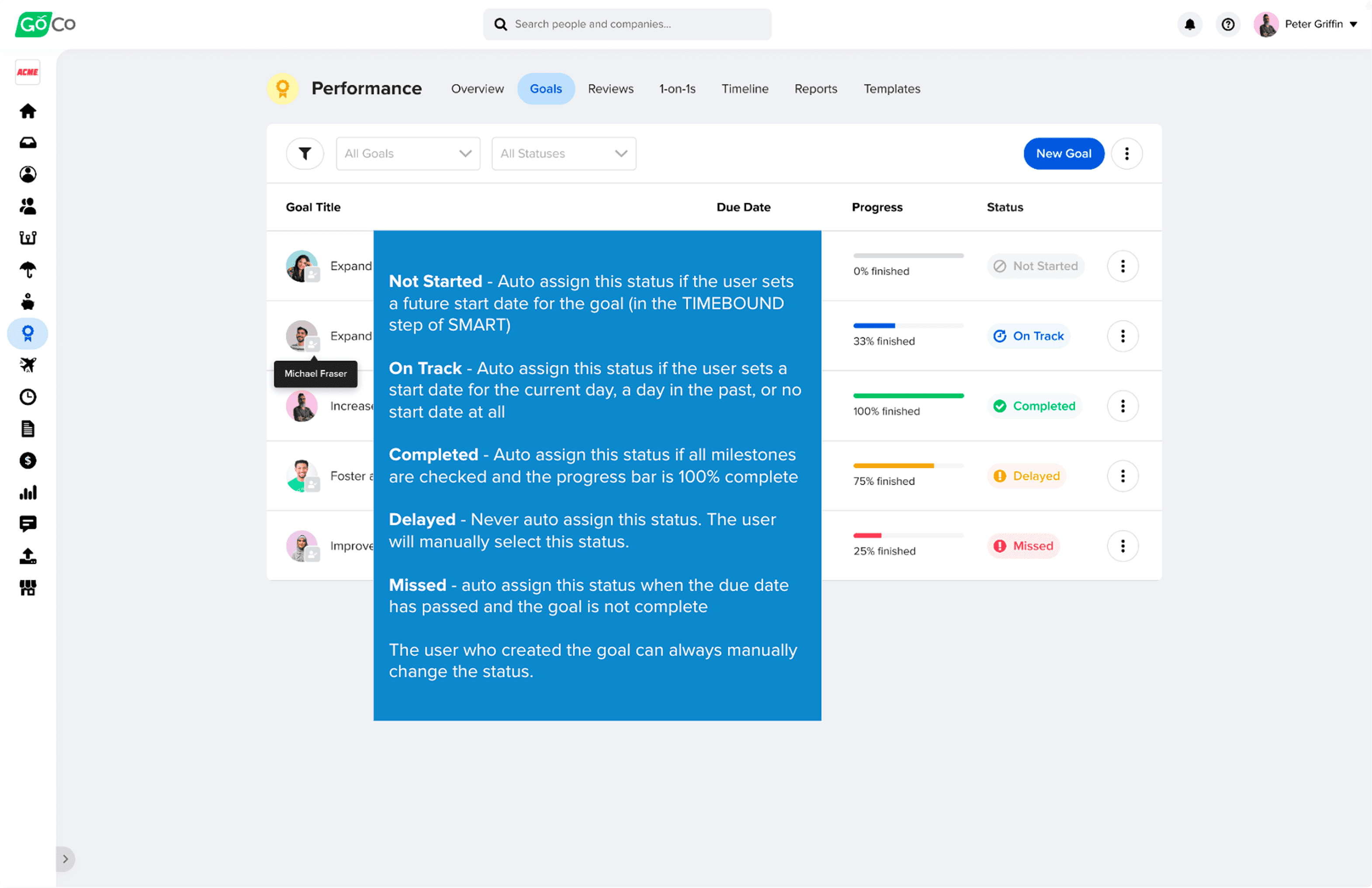
Balanced automation with human judgment by auto-updating goal status based on dates and milestones while still allowing users to override statuses when real-world context demands it.
3. Goal Tracking & Activity – Full Context, Not Just a Checkbox
The goal detail drawer was designed to be the single source of truth for everything related to a goal. Rather than scattering context across multiple tabs or pages, everything lives in one place:
Current status and progress (percentage or milestone completion)
Full edit history — every change to title, due date, description, SMART criteria, or milestones is logged
Comments from both the employee and their manager, with the ability to edit or delete
The goal creator and creation date, visible at all times
Progress can be updated in two ways: manually (entering a percentage directly) or automatically through milestone completion — where checking off milestones incrementally updates the progress bar. This dual mechanism means the system works whether a team uses milestones or not.
Design decision on the activity log: Comments, progress updates, and edits are consolidated into a single timeline rather than separate tabs. This preserves context during performance discussions — a manager reviewing a goal can see the full story of how it evolved, not just its current state.
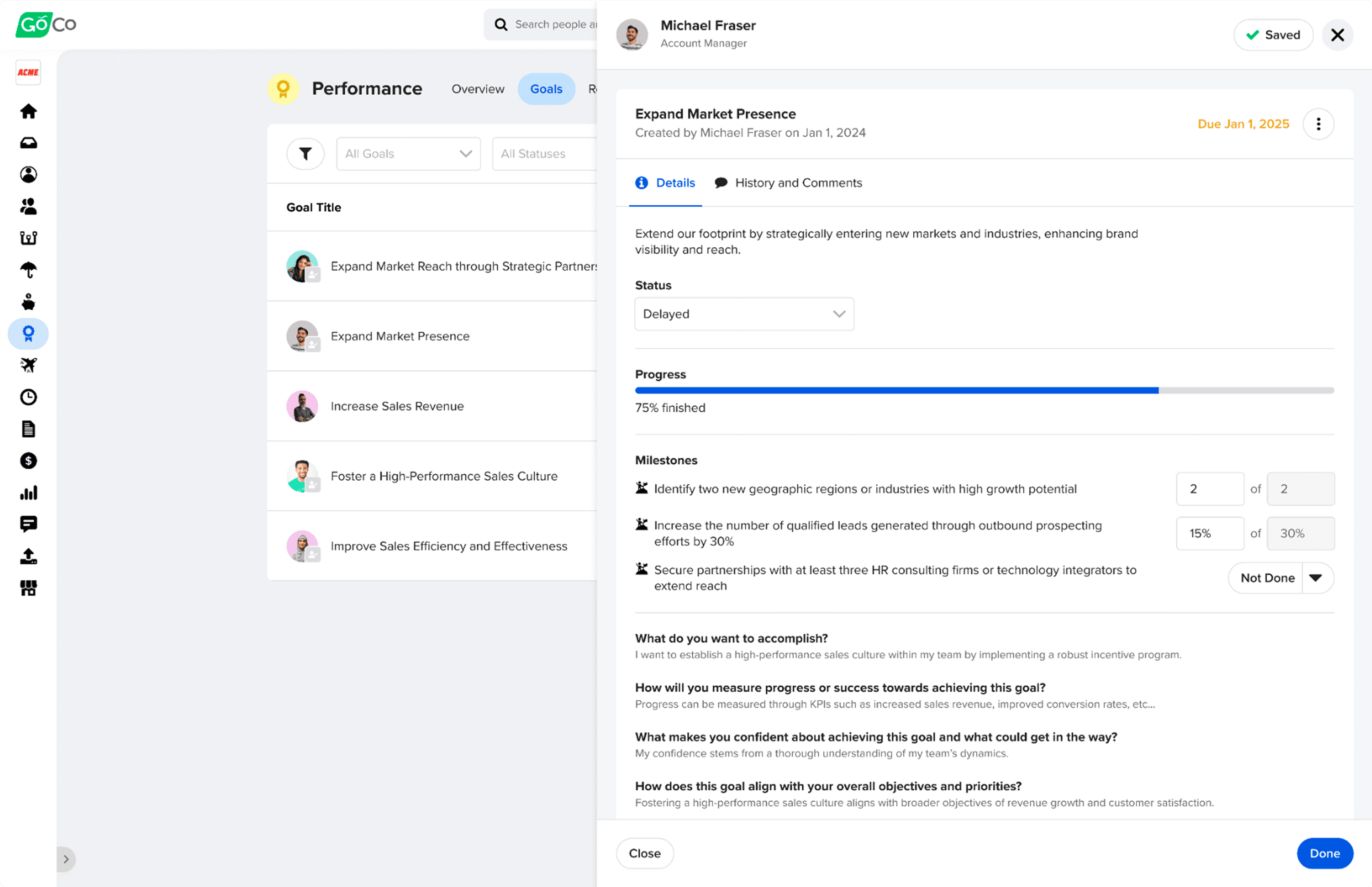
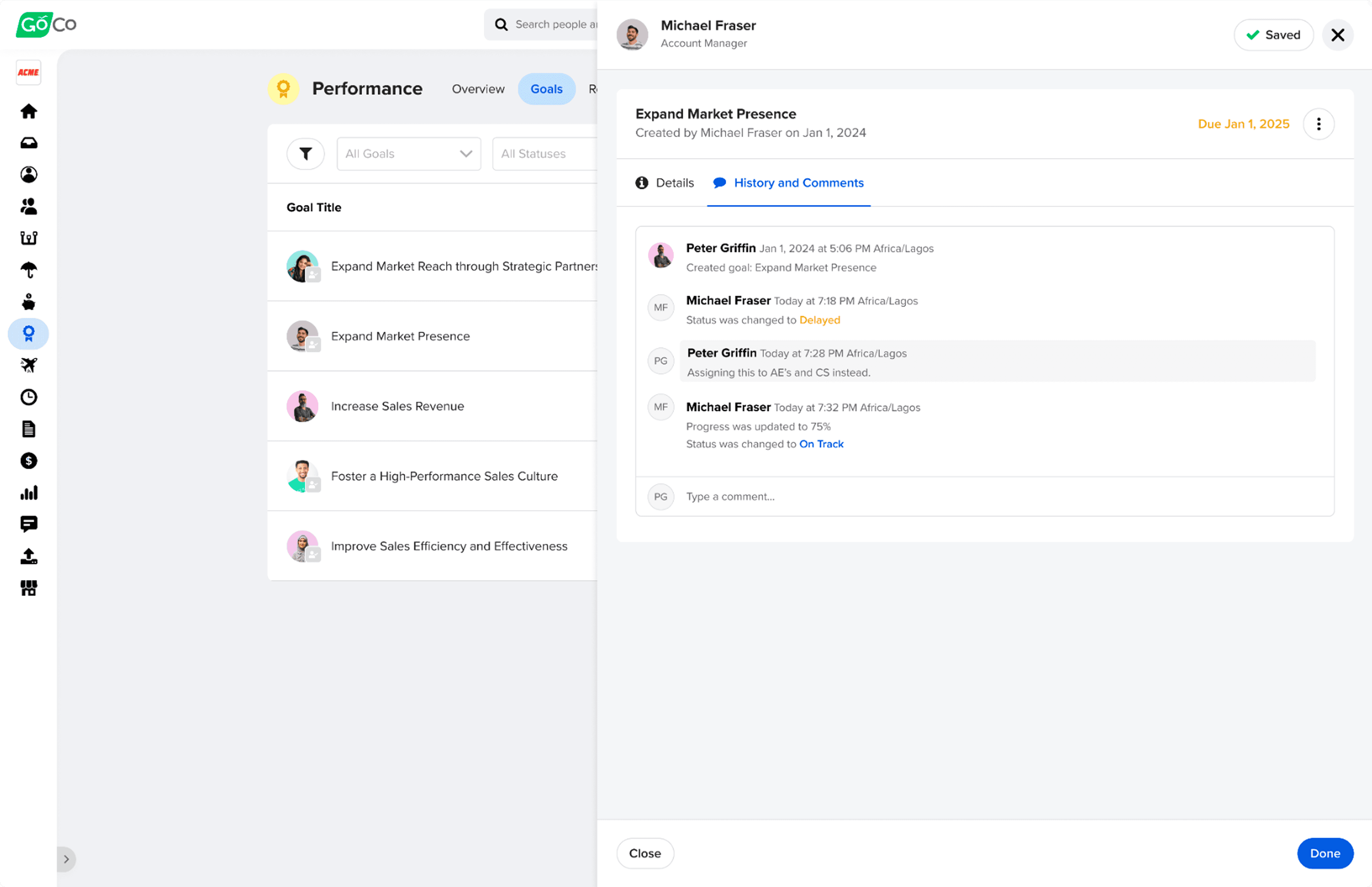
Centralized comments, progress updates, and edits into a single timeline to preserve context and reduce miscommunication during performance discussions.
4. Manager & Admin Dashboards – Visibility Without Overwhelm
The manager dashboard needed to surface goal progress across an entire team without becoming an unreadable wall of data. Key design decisions:
Scanning before clicking: goal status is immediately visible from the dashboard row — managers don't need to open each goal to understand where things stand
Filters for status, team member, department, direct reports, or personal goals — respecting that managers have different access levels depending on their permissions
Archived goals are hidden by default but can be toggled on — keeping the default view clean without losing historical data
Permission rules built into the UI: employees cannot delete goals their manager created for them (archive only), while managers have full edit access to their reports' goals
The admin view extends this further — full access across all team members, configurable permissions, and a dedicated Goals report for running analysis across the organization (goal name, progress, start date, due date, manager, milestones, metric types, and status).
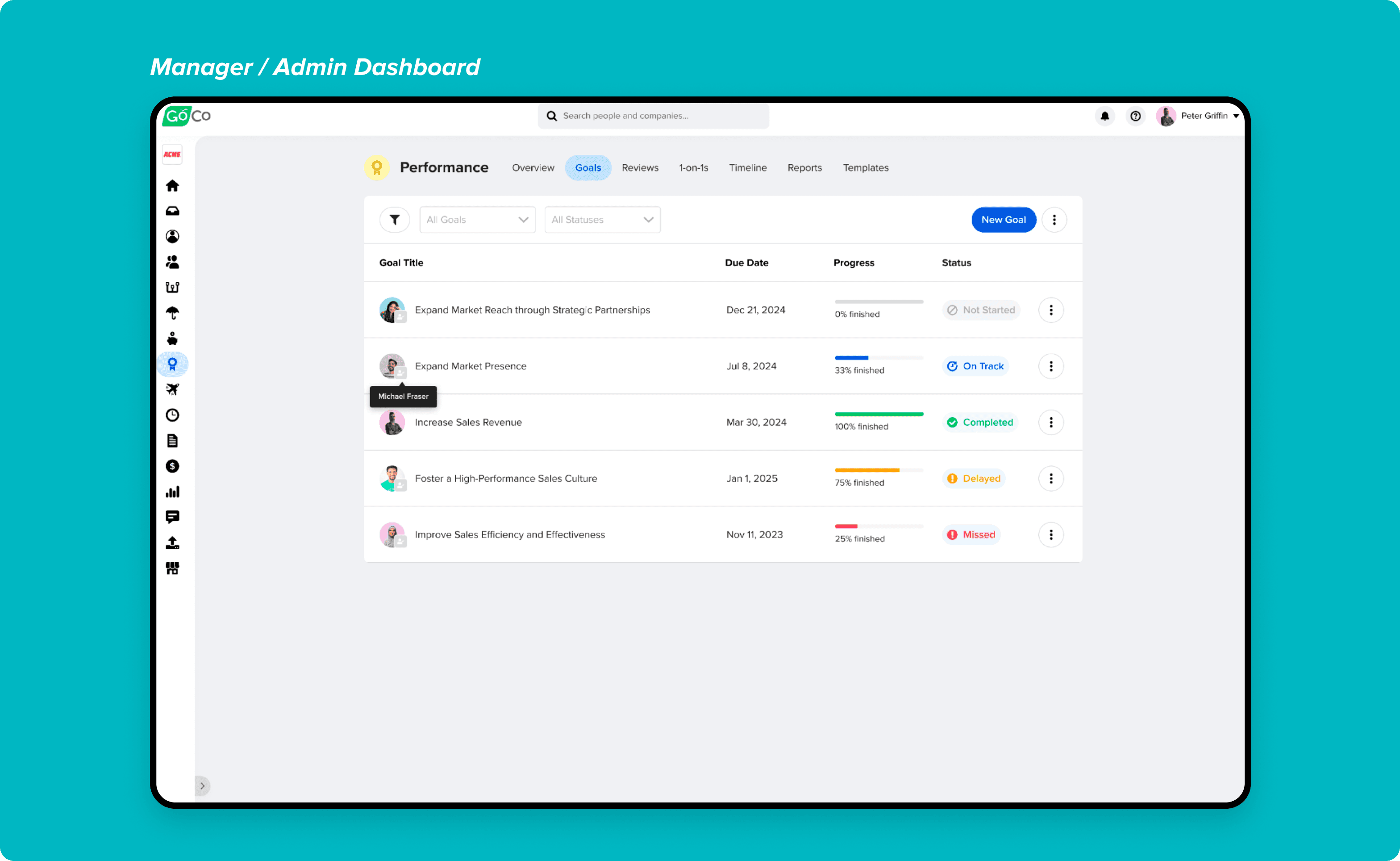
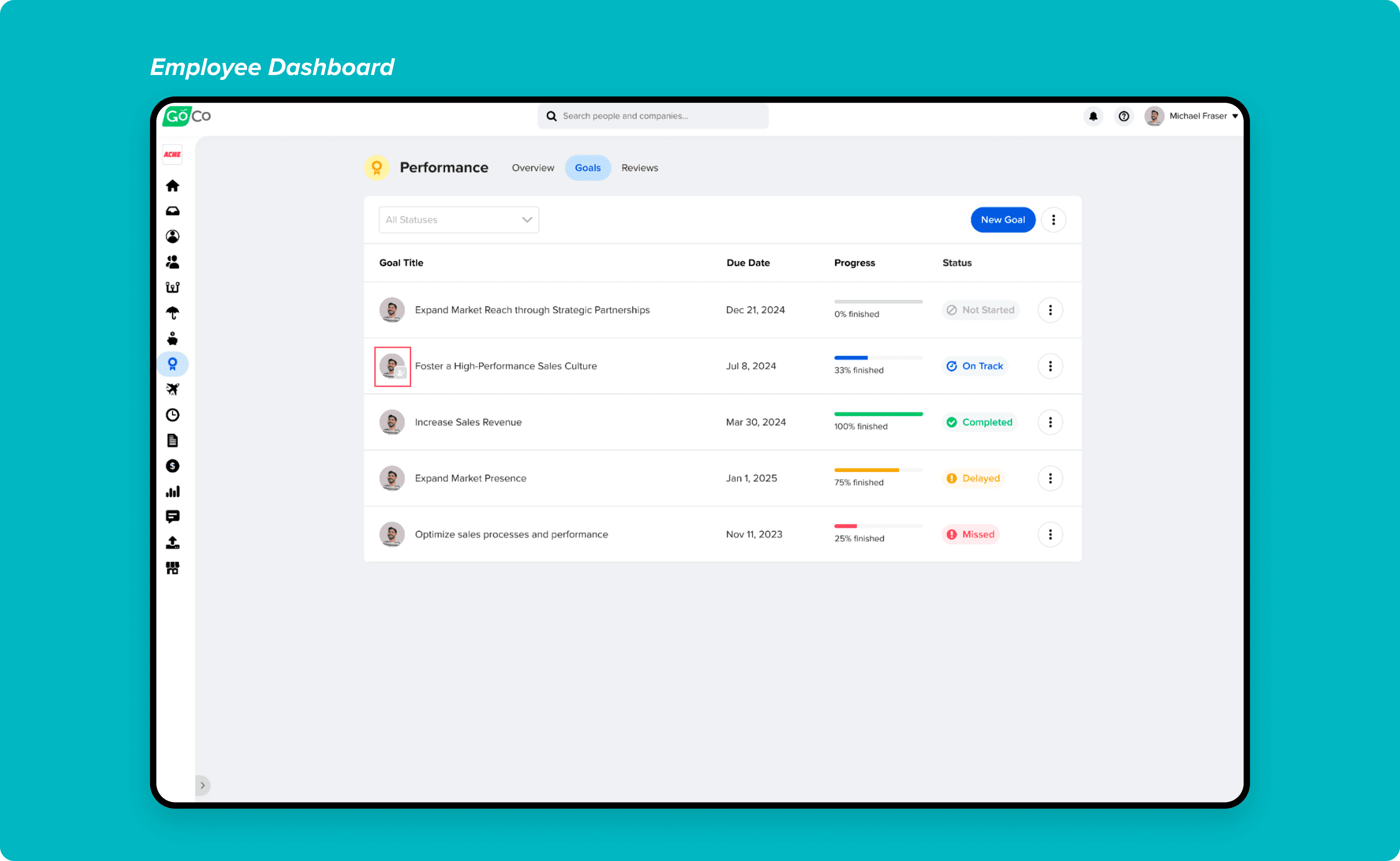
Designed dashboards that make goal progress immediately scannable, helping employees and managers understand status without opening each goal.
5. Goals Inside Performance Reviews – No Context Switching
The most strategically important design decision in the entire feature was how goals connect to performance reviews. The goal was to make the link seamless — so that when a manager is writing a review, they never have to leave the review screen to understand what the employee worked toward.
Two mechanisms were designed:
Reference existing goals: Employees and managers can pull in goals that already exist in the system, selecting which ones are relevant to include in the review.
Create new goals: Goals can be created directly from within the review flow — so forward-looking conversations about growth and development can happen in the same place as the review itself.
The most important design detail: goals are frozen in time once the employee completes the Goals task in their review workflow. This means the review permanently captures the state of the goals at that moment — future edits to a goal don't retroactively change what was documented in the review. This was critical for review integrity.
The right-side panel inside the review surfaces four tabs of employee context: Reviews, Goals, Timeline, and Employment History — each with a configurable date filter so reviewers can look at the right time window for the conversation they're having.
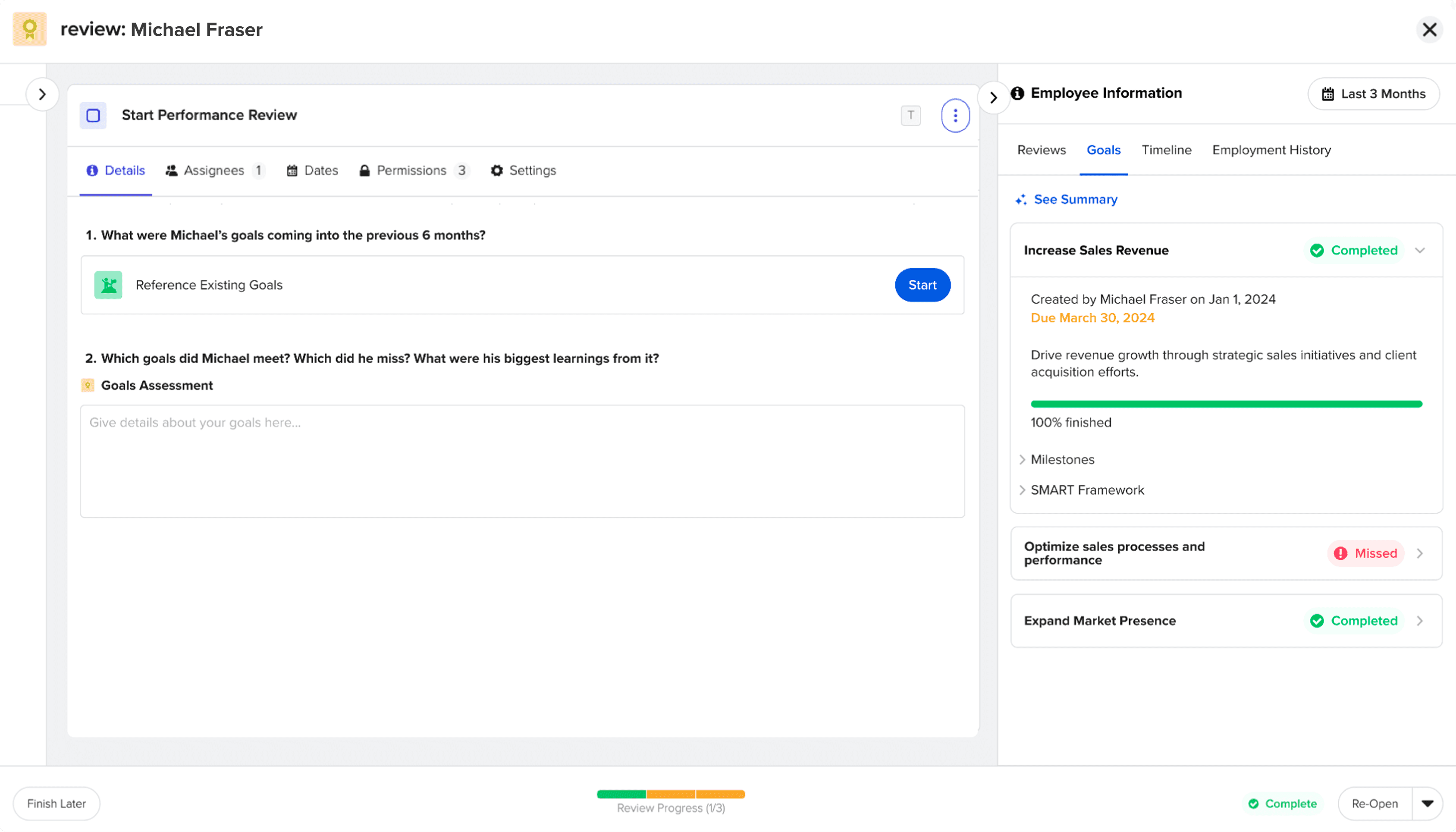
Integrated goals directly into performance reviews to eliminate context switching and ensure reviews reflect real, ongoing work rather than memory-based feedback.
6. AI-Powered Summaries – Four Tabs, One Consistent Experience
The AI summary feature was designed to solve a specific problem: by the time a manager sits down to write or review a performance review, they're often working with weeks or months of data across multiple systems. Reading every goal update, every timeline entry, and every historical review takes time most managers don't have.
AI summaries were added to all four employee info tabs inside the review experience:
Goals summary — highlights, areas of improvement, and a concise overall narrative of goal progress
Reviews summary — synthesizes previous review content into highlights and growth areas
Timeline summary — surfaces achievements, challenges, 1:1 notes, and feedback from the employee's activity timeline
Employment history summary — highlights title changes, salary changes, department and location changes, and suggests relevant considerations
Each summary follows a consistent structure: 2-4 highlights, 2-3 areas of improvement, and a short overall narrative. This consistency made the AI feel like a reliable tool rather than an unpredictable black box.
Design principles for the AI experience:
Clearly labeled as AI-generated at all times — no ambiguity about what's human-written vs. AI-produced
"See Summary" is a tap — never auto-displayed — so managers choose when they want AI context
Summaries are date-filtered to match the selected time window, so the AI is always summarizing the relevant period
Mixpanel tracked every "See Summary" interaction, broken down by tab (reviews, goals, timeline) — giving the team adoption data to improve the feature over time
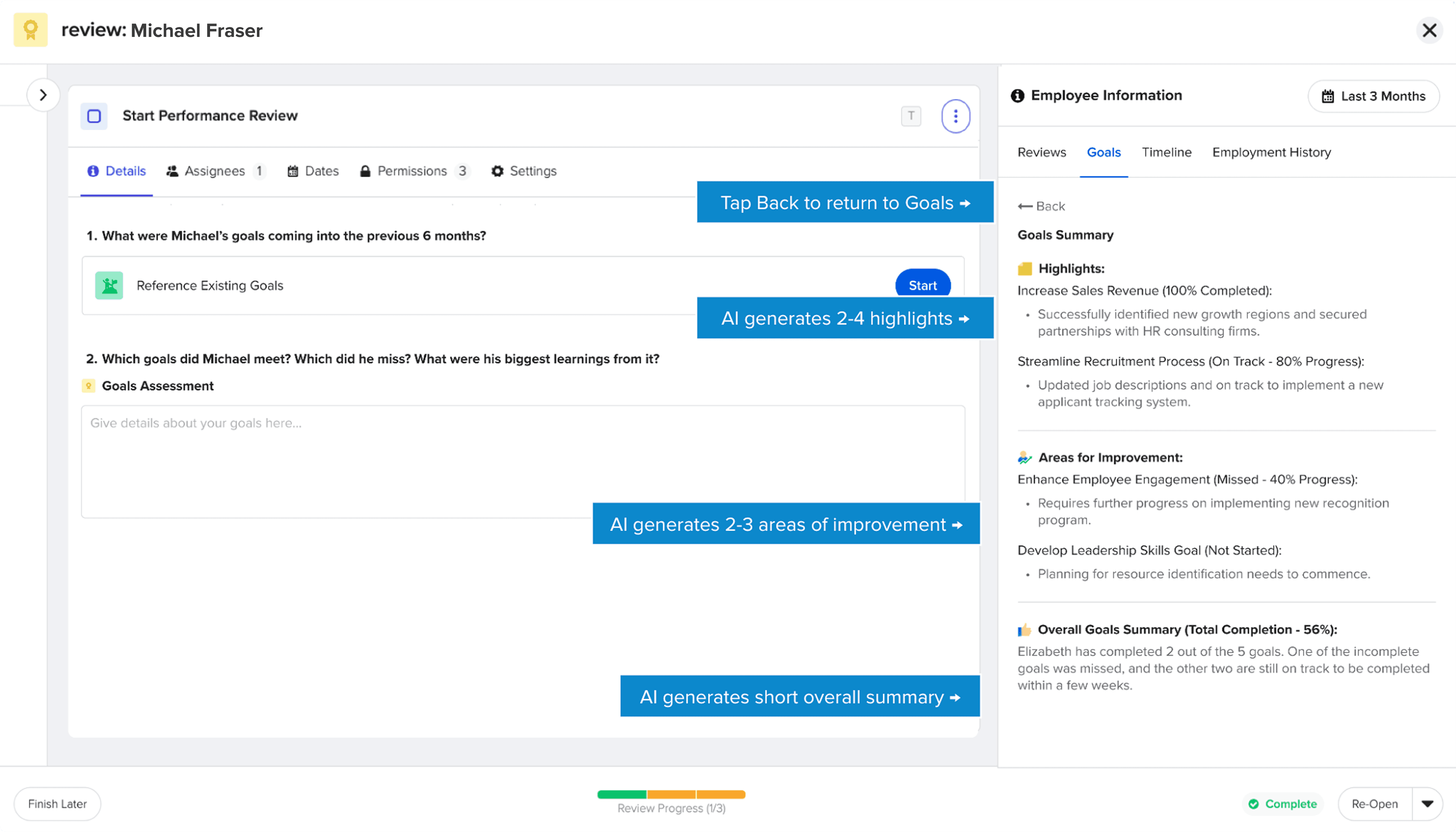
Designed AI summaries to surface highlights, areas for improvement, and an overall narrative, helping managers quickly understand progress without reading raw data.
7. Notifications – Proactive Accountability
The notification system was designed to keep goals alive between creation and due date — the period where most goals quietly die because no one is watching them.
Notifications cover:
Goal created (employee notified when a manager creates a goal for them)
1 week before due date — reminder sent to employee
1 day before due date — final reminder sent to employee
Goal completed — manager notified
Goal missed — manager notified
New comment — the other party notified (manager comments → employee notified, and vice versa)
This system removes the need for manual follow-ups and creates shared accountability between employees and managers without adding administrative burden.
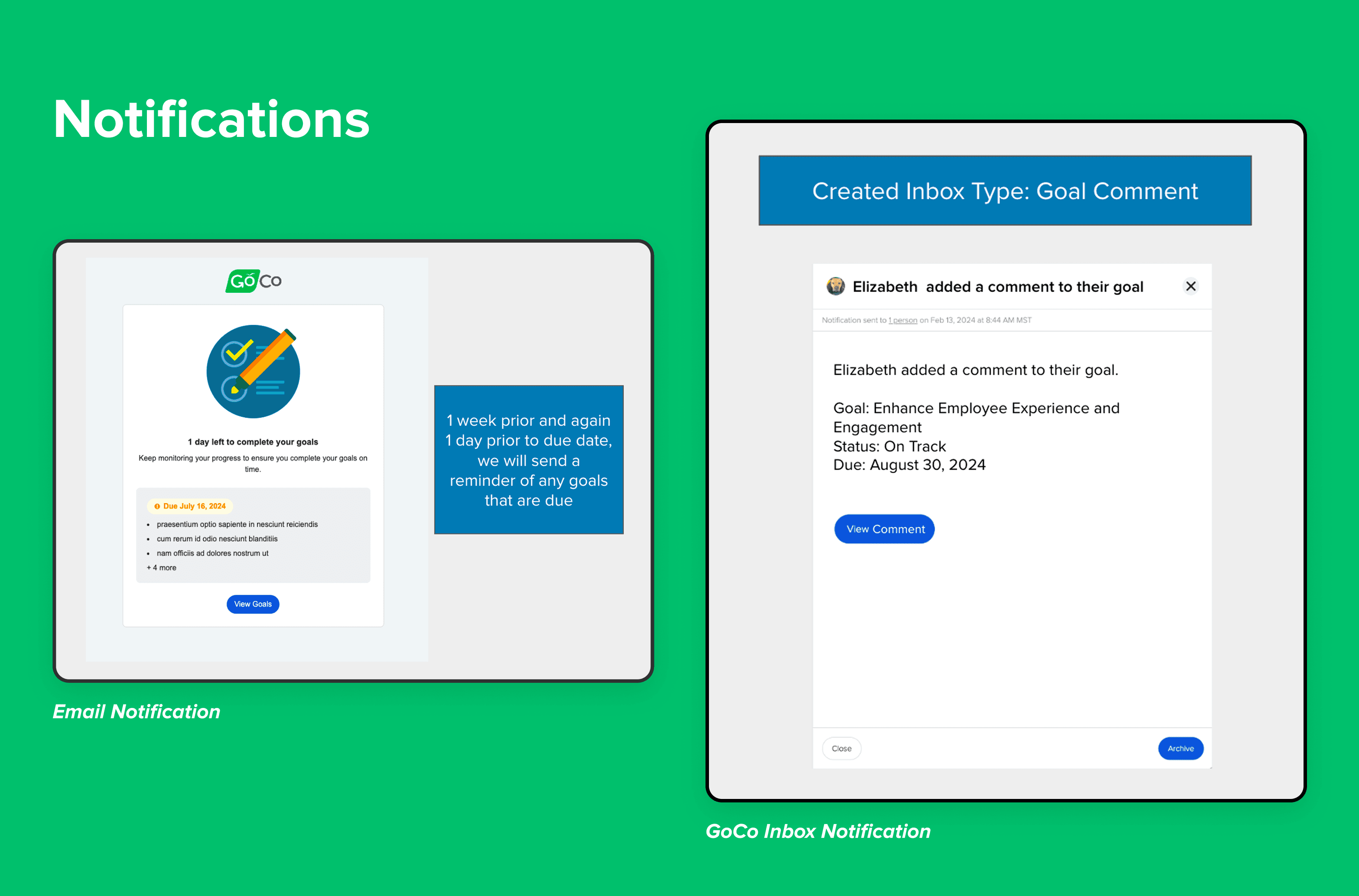
Automated reminders and status-based notifications reduce manual follow-ups while keeping employees accountable for upcoming and missed goals.
Conclusion
Impact & Outcomes
Adoption Target
10%
User adoption within first 6 months — target was met
Mixpanel Events Tracked
5
Goal creation, completion, progress updates, notifications, AI summary interactions
AI Summary Types
4
Goals, reviews, timeline, employment history — all integrated into review experience
What the feature delivered:
A centralized, scalable goal-tracking system that replaced spreadsheets and disconnected tools for 16,000+ GoCo customers
Goals embedded directly into performance reviews — eliminating context switching during review cycles
A complete audit trail for every goal, giving managers and admins full visibility into how goals evolved over time
An AI summary layer across four data types, helping managers prepare for reviews in a fraction of the time
A goals reporting module for admins, enabling organization-wide analysis for the first time
Target: 10% user adoption within the first 6 months of launch
Foundation for future features unlocked:
Team Goals and Company/Organization Goals (the next logical layer above individual goals)
OKR framework support
Advanced goal benchmarking and reporting
Goals visible on the employee's home page and profile performance card — increasing everyday engagement with the feature
Key Learnings
Flexibility beats prescription in goal-setting tools.
Not every team runs structured OKR cycles. Making SMART and milestones fully optional — rather than required — was the right call. Teams adopted the depth of structure they were ready for, which drove higher overall adoption than a rigid framework would have.
Automation earns trust through transparency.
The automated status system worked because we were explicit about the logic. Users knew exactly why a goal changed to "Missed" or "On Track." Hidden automation would have felt unpredictable and eroded trust in the data.
Connecting features creates more value than building them in isolation.
The most impactful design decision wasn't any individual UI choice — it was the decision to embed goals directly into performance reviews. That integration transformed both features: reviews became more grounded in evidence, and goals became more meaningful because they were tied to real evaluation moments.
AI is most valuable when it compresses time, not when it replaces judgment.
The AI summaries weren't designed to write reviews for managers — they were designed to help managers walk into a review conversation already oriented. That distinction shaped every design decision: the framing, the structure, the "See Summary" trigger, the consistent format. The result was a feature managers actually wanted to use.
Final Takeaway
Goal tracking is not just a task list — it's a continuous feedback system. By designing flexible goal creation, clear progress visibility, automated accountability, and deep integration with performance reviews, this feature helps teams stay aligned, motivated, and accountable over time.
And by connecting it to AI summaries, we made it possible for managers to walk into their most important conversations — performance reviews — fully informed and ready to have a real conversation about growth.